




LION Digital, Author at Premium eCommerce marketing services - Page 9 of 10

WebMaster Hangout – Live from November 26, 2021

Same Language Content for Different Countries

Q. It’s more reasonable to have one version of the website targeting different countries with the same language, rather than different versions of the same language website.

  • (00:47) The person asking the question has a website that has almost the same but separate versions for UK and USA, and he is not sure what the best strategy for managing them is. John says, that having English US and English UK versions means that Google would swap out the URL for the appropriate version depending on the country, So if there is a different content for the two versions, even if that’s something like a contact address or currencies or things like that, then that makes sense to have it on separate URLs. If it’s all the same content, if it’s really just like a text article, then it’s more reasonable to make it one English version. The content can’t be limited to those two countries anyway, so having one version is an easy solution. Another advantage of having one version, apart from having to do less maintenance work, is the fact that for Google it’s a lot easier to rank that one page versus multiple pages with the same content.

Q. The way the format of images on the website is changed defines whether or not there might be changes in rankings.

  • (06:45) The person asking the question is redesigning her website in AMP pages and is converting all her images to WebP format, and she’s trying to use the same URLs. she is concerned with the fact that converting JPEG images to WebP might affect her rankings. John agrees, that it could potentially affect the rankings. He mentions that he has seen some people use the same image extensions and make them WebP files. If that works, that would help lower the amount of work that needs to be done. Because then the content would just be swapped out, but URLs will be the same and all of that will continue to work. Whereas, if the image URLs are changed, or if the URLs of the landing pages for the images are changed, the image search takes a little bit longer to pick up. The thing to keep in mind here is that not all sites get significant traffic from image search, so sometimes it’s something where theoretically it’s a problem to make these changes that take time.

Deleting JavaScript from the Website

Q. When deleting JavaScript from a page to simplify it for Googlebot, it’s important to not end up giving Googlebot and users a very different page experiences.

  • (11:30) If JavaScript is not required for the website pages, for the content and for the internal linking, then probably deleting it doesn’t change anything. John says to be cautious about going down the route of making more simplified pages for Googlebot, because it’s easy to fall into a situation where Googlebot sees something very different than what the users usually see, and that can make it very hard to diagnose issues. So if there’s some bug that’s only affecting the Googlebot version of the site, the website owner wouldn’t see it, if users always see a working website.
    Another thing to watch out for is the fact that in product search, Google sometimes checks to see what happens when users add something to their carts, just to kind of double-check that the pricing and things like that are the same. And if, for example, the Add to Cart functionality is removed completely for crawlers, then maybe that affects kind of those checks that product search does. However, John says that he doesn’t know the details of what exactly product search is looking for.
    In general, Google tries to render the page to see if there’s something missing, but it doesn’t interact with the page, as it would take too much time to crawl the web if it had to click everywhere to see what actually happened. So Googlebot’s experience is different from what users see, and removing JavaScript might affect that.

Q. Sometimes it’s hard for Google to determine from the search query whether the user needs local results or the ones in a more global context. The same goes for both the regular search and the Featured Snippets.

  • (16:44) The Featured Snippet from Google’s point of view is essentially a normal search result, that has a little bit of a bigger snippet and a little bit more information there. But otherwise it’ a normal search result. And from Google’s point of view, it tries to do two things when it comes to searches. On the one hand, it tries to recognise when a user wants to find something local. And when it recognises that, it uses the geotargeting information that it has from the websites to figure out which are likely the more local results that would be relevant for the user. The local aspect is something that helps to promote local websites, but it doesn’t mean that they will always replace anything that is global. Global in this context might mean bigger websites. So Google sees these global websites, and on the other hand, kind of local results from the same country. And depending on how it understands the query, it might show more local results or more from the global search results. For example, when someone is searching for Switzerland, then, of course, Google recognises that the user wants something from Switzerland, and it can strongly promote local results. But without that addition, sometimes it’s hard for Google to determine whether the local context is critical or not for this particular query. And sometimes it will just take global results in a case like that. And that’s not really something that a website owner can influence.

Website Authority

Q. With the fast-changing dynamics of the Internet, Google doesn’t have a long-term memory of the things that were wrong about the website.

  • (22:38) Google pretty much has no memory for technical issues on websites, in the sense that if it can’t crawl a website for a while, or if something goes missing for a while and it comes back, then there is that content again, Google can have that information again, it can show it. And that gets picked up pretty quickly. That is something Google has to have because the Internet is sometimes very flaky, and sometimes sites go offline for a week or even longer, and they come back, and it’s like nothing has changed, but the website owners fixed the servers. And Google has to deal with that since the users are still looking for those websites. 
    It’s a lot trickier when it comes to things around quality in general, where assessing the overall quality and relevance of a website is not very easy, and it takes a lot of time for Google to understand how a website fits in with regards to the rest of the Internet. And that means on the one hand, that it takes a lot of time for Google to recognise that maybe something is not as good as it thought it was. And, similarly, it takes a lot of time for Google to learn the opposite way. And that’s something that can easily take a couple of months, a half a year, sometimes even longer than a half a year. So that’s something where compared to technical issues, it takes a lot longer for things to be refreshed in that regard.
    John also points out that there are these very rare situations, when a website gets stuck in some kind of a weird in-between stage in Google’s systems, in that at some point the algorithms reviewed the website and found it to be absolutely terrible. And for whatever reason, those parts of the algorithms just took a very long time to be updated again, and sometimes that can be several years.
    It happens extremely rarely, especially now, says John. But he suggests that if someone struggles and really sees that he’s doing a lot of things right and nothing seems to be working, it is worthwhile to reach out to Google stuff and see if there is something on the website that might be stuck.

Alt Text and Lazy Load Images

Q. It is not problematic to add alt text to the image that is lazy loaded, even if it’s a placeholder image.

  • (26:31) When Google renders the page, it has to or tries to lazy load the images as well, because it tries to load the page in very high viewport, and that triggers lazy loading. And usually, that means Google can pick up the alt text and associate with the right images. If the alt text is already in place, and the placeholder image is currently there, and Google just sees that, then that shouldn’t be a problem per se. It’s kind of like giving information about an image that is unimportant. But it’s not that the rest of the website has kind of like a bad or a worse standing from that point of view. The thing to watch out for here more is that Google can actually load the images that are supposed to be lazy-loaded here. So in particular, Google doesn’t watch out for things like the data source attribute. It essentially needs to see the image URL in the appropriate source attribute for the image tag, so that it can pick it up as an image.

Google Analytics Traffic

Q. Sometimes traffic from Google Discover might create a situation where, when checking the website analytics, lots of traffic comes from direct traffic at random times.

  • (32:02) If there is a situation where a huge amount of traffic starts dropping into the direct channel. One of the things that could be playing a role in that case is Google Discover. In particular, Google Discover is mostly seen as direct traffic in Google Analytics. And Google Discover is sometimes very binary, in the sense that it’s either the website gets a lot of traffic or it doesn’t get a lot of traffic from Google Discover. So that could be something where if the website owner is to just look at analytics, there might be these spikes of direct traffic happening there. In Search Console, there’s a separate report for Google Discover, so this kind of thing can be double-checked there.

Shop Ratings

Q. For an e-commerce shop it’ more advised to use product ratings, while for a directory of other e-commerce sites it’s fine to have ratings on those individual sites.

  • (34:33) When it comes to shop ratings, Google wouldn’t try to show them if they’re on the shop themselves. So essentially, for local businesses, the idea is that if there is a kind of like a local directory of local businesses, then putting ratings on those local businesses will be fine, and that’s something Google might show and search. But for the local businesses themselves, putting a rating on their own websites is not an objective rating. It can be manipulated to look a little bit more legitimate. And that’s not really something that Google can trust and show in the search results. From that point of view, for an e-commerce shop, it’s better to use products ratings, because the individual products can be reviewed either by the website itself – the shop can clearly specify that it was reviewed by the shop itself. Or aggregate ratings can be used, which would be from users. On the other hand, for a directory of other e-commerce sites, of course, having ratings on those individual sites would be an option.

Search Console

Q. If the number of good pages goes down while the number of bad pages goes up in Search Console, that’s the sign of some kind of problem on the website, if both numbers just go down, it means there’s not enough data for Google to make any conclusion, and that’s perfectly fine.

  • (37:35) Essentially, what Google does with regards to the Core Web Vitals and the speed in general – it tracks the data based on what it sees from users, a specific kind of user. That’s documented on the Chrome side. And only when Google has sufficient data from users, will it be able to use that in Search Console, and additionally, in Search Console, it creates groups of pages where it thinks that this set of pages is the same. And if Google has enough data for this set of pages, then it will use that. That also means that if there’s just barely enough data for that set of pages, then there can be a situation where sometimes Google has enough data and it would show it. And sometimes it doesn’t have enough data, and it might show as a drop in the number of good pages. That essentially doesn’t mean that the website is bad, it just means there’s not enough data to tell. So if just the overall number of the pages goes down in Search Console, and over time the overall number goes back up again, then it means there is almost enough data for Google to use. If the number of good pages goes down and the number of the bad ones goes up, that’s a sign that there’s a problem that Google sees there. So if just the overall number goes down, it could be ignored, it’s perfectly fine.

Out Of Stock Pages

Q. How Google will treat out of stock product pages depends on whether it will see them as soft 404 pages or not.

  • (44:29) Google tries to understand when a page is no longer relevant based on the content of the page. So, in particular, the common example is a soft 404 page, where there is a page that looks like it could be a normal page, but it’s essentially an error page that says “This page no longer exists”. And Google tries to pick up things like that for e-commerce as well. When out of stock products are seen as soft 404 pages, Google drops them completely from search, if it keeps the page indexed despite being out of stock, the ranking of the page will not change. It essentially will still be ranked normally. It’s also still ranked normally if the structured data is changed to say that something is out of stock. So from that point of view, it’s not that the page would drop in ranking, it’s more that either it’s seen as a soft 404 page or it’s not. If it’s not seen as a soft 404 page, it’s still a normal page.

User Reviews

Q. There are different ways on how to go around showing customers’ reviews about the particular business, but it’s still not possible for the business to show those in the search results.

  • (54:03) The customer rating reviews can be put on the homepage. Google would see these more as testimonials because the website owner is kind of picking and choosing what he wants to show. Using structured data for that on the website is something that Google wouldn’t like to see – it would probably ignore that. But sending users to a third-party review site where they can review it is kind of the best approach here. Because what would happen then is if Google shows that listing from that third-party review site, it can show the structured data for the business there. For example, the business is listed on Yelp, and they leave the reviews there. When that Yelp listing is shown in search, Google will know that this is a list of businesses essentially, so it can show the structured data about the business. And then it can use that review and markup and show those stars in the search results. So if Yelp has structured data, then that’s something that Google could pick up there. Showing it on the website as well in a textual form is perfectly fine.
    And testimonials are very common and popular, but it’s just Google wouldn’t show the stars in the search result for that. 

Sign up for our Webmaster Hangouts today!
GET IN CONTACT TODAY AND LET OUR TEAM OF ECOMMERCE SPECIALISTS SET YOU ON THE ROAD TO ACHIEVING ELITE DIGITAL EXPERIENCES AND GROWTH 

Analysing Your Business Performance and Identifying Growth Opportunities for 2022

2021 was a unique year for businesses – retail sales were crashing before picking up steam this October, and the economy was in decline up until that point. This sudden reversal in buying behaviour and business trends highlight the importance of identifying potential areas of growth and capitalizing on opportunities this 2022.

So, how do you do this? When conducting an annual performance review we look at overall performance across five key metrics (per channel): Sessions, Conversion Rate, Transactions, Average Transaction Value, and Revenue.

Why these metrics? Because you can simplify the formula for generating revenue to this equation:

Sessions x Conversion Rate x Average Transaction Value = Revenue

Improve the performance of a single metric, and you improve your overall revenue by the same amount.

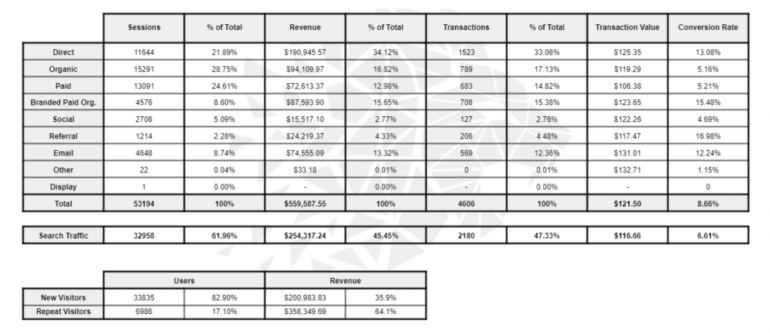
To start increasing your revenue, the first step would be to conduct a channel analysis. This is where you compare the annual performance of each channel, with the goal of identifying the percentage of users driven to a channel versus the percentage of revenue generated for each channel.

The results should be similar for all the channels – any significant differences may indicate opportunities for optimization. For example, a high number of sessions with low revenue generated would indicate a problem with conversion, or a potential issue with tracking.

Channel Performance Average Month (Past 12)

In this example, we combined the Organic and Paid channels to measure the “Search” Channel. Why? Because users don’t choose what type of search they do – they just “search”.

In the example we used, we combined the Organic and Paid channels to measure the “Search” Channel. Why? Because users don’t choose what type of search they do – they just “search”.

You then measure the performance for the past 12 months in order to get a picture of what the average month looks like, and once calculated, there are 2 ways to proceed:

Conducting a Month on Month Analysis

This is done by comparing the performance of each month vs. the average month, with the goal of identifying the cause for the significant differences in traffic or revenue.

By extracting this data, this can be presented in ways that can be easier to understand, or with complex data sets to further identify potential issues.

Benchmarking vs competitors using other important eCommerce Metrics

It is important to measure how your business is performing, but if you really want to keep improving, you should look at your competitors’ data, and compare them with yours in these metrics:

New Vs Repeat Visitors / Revenue

This is used to identify the quality of traffic and any potential issues with conversion.

Repeat Purchase Rate

Can be used to measure traffic, but is mainly used to determine consumer loyalty and the quality of post-purchase marketing and services.

Days / Sessions to Purchase

The number of days or sessions it takes before a consumer makes their first purchase. This is useful for planning out re-engagement opportunities or remarketing campaigns.

Path to Purchase

Most consumers don’t purchase during their first visit to a site – they often visit multiple times prior to making their first purchase. This metric is useful for optimizing your campaigns and identifying the most effective platforms to reach your target customers.

Channel Efficiency

This is computed by getting your total online revenue divided by the amount spent on marketing that channel. The channels which have greater scores are deemed to be more efficient, and are useful for determining channel performance and which ones to spend more on.

Analysing your performance is important to continuous success in the eCommerce industry. This allows you to identify opportunities, optimize resource allocation, and steer your business towards success. 

Want to supercharge your business and implement a measurable strategy?

At LION Digital, we create analytics on a personal level called LION view – a dashboard that collects all your company data and makes your year-end performance review easier and much more comprehensive. This completely customisable, all-in-one and simple-to-use platform gives you an overview of eCommerce channels and metrics, Keywords rankings, Google Search Console data, our 90 day activity plan and your marketing calendar all in one convenient location.

GET IN CONTACT TODAY AND LET OUR TEAM OF ECOMMERCE SPECIALISTS SET YOU ON THE ROAD TO ACHIEVING ELITE DIGITAL EXPERIENCES AND GROWTH 

Article by

Christopher Inch – Head of Strategy

Chris is a specialist in eCommerce with over 14 years of experience in Digital & eCommerce Strategy, including Search Marketing, Social Media, Email Marketing Automation and Web Development.

Like what we do? Come work with us

WebMaster Hangout – Live from November 19, 2021

Mobile Friendliness

Q. Pages that are not mobile-friendly don’t fall out of being indexed

  • (00:40) Even if website pages are not completely mobile-friendly, they should still be indexed. Mobile-friendliness criteria is something Google uses as a small factor within the mobile search results, but it definitely still indexes those pages. Sometimes this kind of issue can come up temporarily where Google can’t crawl one of the CSS files for a brief time, as then it doesn’t see the full layout. But if these pages look okay when being tested manually in the testing tool, then there isn’t really a problem and things will go back to normal eventually.

Title Length

Q. On Google’s side, there are no guidelines on how long a page title should be

  • (03:02) Google doesn’t have any recommendations for the length of a title. John says that it’s fine to pick a number as an editorial guideline based on how much space there is available, but from Google’s search quality and ranking side, there aren’t any guidelines that state some kind of required length. Ranking doesn’t depend on whether the title is shown shorter or slightly different – the length doesn’t matter.

URL Requirements

Q. Length of URL and words contained in URL matter mostly for users, not for SEO

  • (04:53) URL length doesn’t make any difference. John says that it’s good practice to have some of the words in the URL so that it’s a more readable URL, but it’s not a requirement from an SEO point of view. Even if it’s the ID to a page, it’s okay for Google too. It’s good to have words, but it’s essentially something that just users see. For example, when they copy and paste the URL, they might understand what the page is about based on what they see in the URL, whereas if they just see the number, it might be confusing for them.

Doorway Pages

Q. If a website has a very little number of similar landing pages, they are not considered doorway pages

  • (14:41) The person asking the question is worried about the fact that his seven landing pages that target similar keywords and have almost duplicate content would be flagged as doorway pages and would be de-listed. John explains that with just seven pages, he probably wouldn’t have any problems, even if someone from the Web Spam Team was to manually look at that. They would see that it’s seven pages, not thousands of them. It would be different, if someone, for example, a nationally active company, had a separate page for every city in the country. Then the Web Spam Team would consider that as beyond acceptable and problematic, where they would need to take action to preserve the quality of the search results.

Reviews Not Showing Up in SERPs

Q.If reviews on a page are not left on the page itself, but are outsourced from some other website, they’re not going to show up in SERPs

  • (21:35) For a review to show up in the search results, it needs to be based on a specific product on that page and it needs to be the thing that a user left directly on that page. So if a website owner was to archive reviews from other sources and post them, then Google wouldn’t pick those up as reviews for the structure data side. These can be kept on the page, it’s just Google wouldn’t use the review markup for that.
    It’s a tricky process because Google tries to recognise this situation automatically and sometimes it doesn’t recognise it and shows the review. There are some sites that have these reviews shown because Google didn’t recognise that it was not left on the site. But from a policy point of view, Google tries not to show reviews that are left somewhere else and are copied over to a website.

Search Console Verification

Q. It’s possible to have a site verified multiple times in Search Console

  • (24:47) In Search Console, it’s possible to have a site verified multiple times, as well as to have different parts of the site verified individually. It doesn’t lose any of the data when the website is verified separately. That’s something, where it’s okay to have both the host level as well as domain level verification running in Search Console.

Crawling AMP and non-AMP Pages

Q. Google tries to keep a balance between crawling AMP and non-AMP pages of a website

  • (26:42) Google takes into account all crawling that happens through the normal Google Bot infrastructure and that also includes things like updating the AMP cache on a website. So if there are normal pages as well as AMP versions and they’re hosted on the same server, then the overall crawling that Google does on that website is balanced out and that includes AMP and non-AMP pages. So, if the server is already running at its limit with regards to normal crawling and AMP pages are added on top of that, then Google has to balance and figure out what it can do there – which part it can crawl at which time. For most websites, that’s not an issue. It’s usually more of an issue for websites that have tens of millions of pages, Google barely gets through crawling all of them and when another kind of duplicate of everything is added, then it makes it a lot harder. But for a website with thousands of pages, adding another thousand pages from the AMP versions is not going to throw things off.

Indexing Process

Q. The way Google indexes pages and the way request indexing tool work have changed over the past few years

  • (32:27) In general, the ‘request indexing tool’ in the Search Console is something that passes it on to the right systems, but it doesn’t guarantee that things will automatically be indexed. In the early days, it was something that was a lot stronger in terms of the signalling for indexing, but one of the problems that happens with this kind of thing is that people take advantage of that and use that tool to submit all kinds of random stuff as well. So over time Google systems have grown a little bit safer in that they’re trying to handle the abuse that they get, and that leads to things sometimes being a bit slower, where it’s not so much slower because it’s doing more, but it’s slower because Google tries to be on the cautious side. This can mean things like Search Console submissions take a little bit longer to be processed, it can mean that Google sometimes needs to have a confirmation from crawling and kind of a natural understanding of a website before it starts indexing things there.
    One of the other things that have also changed quite a bit across the web over the last couple of year, is that more and more websites tend to be technically okay in the sense that Google can easily crawl them. So on the one hand, Google can shift to more natural crawling and on the other hand, that means a lot of stuff it gets, it can crawl and index, which means because there’s still a limited capacity for crawling and also for indexing, Google needs to be a little bit more selective there, and it might not be picking things up fast.

Pages Getting Deindexed

Q. Some pages are being deindexed as new pages are added to the website is a natural process

  • (37:02) For the most part, Google doesn’t just remove things from its index, it kind of picks up new things as well. So, if there’s new content added at the same time and some things get dropped on along the way from the index, usually that is normal and expected. Essentially, there are pretty much no websites that Google indexes everything on the website. It’s something where, on average, between 30 and 60 percent of a website tends to get indexed. So, if there are hundreds of pages added per month and some of those pages get dropped or some of the older or less relevant pages get dropped over time, that is kind of expected.
    To minimise that, the value of the website overall needs to be shown to Google or the users, so that Google will decide to try and keep as much as possible from the website in the index. 

Website Migration

Q. After a few months post website migration, it’s better to remove the old sitemap from the old website

  • (41:58) Usually, when someone migrates a website, they end up redirecting everything to the new website and sometimes they keep a sitemap file of the old URLs in Search Console with the goal that Google goes off and crawls those old URLs a little bit faster and finds the redirect. That’s perfectly fine to do in a temporary way, but after a month or two, it’s probably worthwhile to take that sitemap out because what also happens with the sitemap file is it tells Google which URLs are important. Pointing at the old URLs is almost the same as indicating that the old URLs need to be findable in search and that can lead to a little bit of conflict in Google systems because the website owner is pointing at the old URLs but at the same time, they’re redirecting to the new ones. Google can’t understand which ones are more important to index. It’s better to remove that conflict as much as possible, and that can be done by just dropping that sitemap file.

Spider Trap

Q. Whenever there are spider trap URLs on a website, Google usually ends up figuring them out

  • (46:06) If there is something on a website, like, for example, an infinite calendar where it’s possible to scroll into March 3000 or something like that and essentially one can just keep on clicking to the next day and the next day, and it’ll always have a calendar page for that, that’s an infinite space kind of thing. For the most part, because Google crawls incrementally, it’ll start off and go off and find maybe 10 or 20 of these pages and recognise that there’s not much content there, but think that it will find more if it goes deeper. Then Google goes off and crawls maybe 100 of those pages until it starts seeing that all of this content looks the same, and they’re all kind of linked from a long chain where someone has to click “next”, “next”, “next” to actually get to that page. At some point, Google systems see that there’s not much value in crawling even deeper here because they found a lot of the rest of the website that has really strong signals telling them that those pages are actually important compared to the really weird long chain on the other side. Then Google tries to focus on the important pages.

Multilingual Content

Q. When there is multilingual content, it’s advised to use hreflang to handle that correctly

  • (53:13) In general, if there is multilingual content on a website, then using something like hreflang annotations is really useful because it helps Google to figure out which version of the content should be shown to which user. That’s usually the approach to take. 
    While with a canonical tag, Google knows which URL to focus on. So the canonical should be the individual language versions – it shouldn’t be one language as a canonical for all languages. Each language has its own canonical version – like there is the French version and the French canonical, the Hindi version and the Hindi canonical. So it shouldn’t be linking across languages.

Sign up for our Webmaster Hangouts today!
GET IN CONTACT TODAY AND LET OUR TEAM OF ECOMMERCE SPECIALISTS SET YOU ON THE ROAD TO ACHIEVING ELITE DIGITAL EXPERIENCES AND GROWTH 

WebMaster Hangout – Live from November 12, 2021

No-Index and Crawling

Q. If a website had no index pages at some point, and Google hasn’t picked up the pages after they became indexable, it can be fixed by pushing the pages to get noticed by the system

  • (08:18) The person asking the question is concerned with the fact that there are a handful of URLs on his website that at some point had no index tag. A couple of months have passed since the removal of no-index, but Search Console still shows that those pages have a no-index tag from months ago. He resubmitted the sitemap, requested indexing via Search Console, but the pages are still not indexed. John says that sometimes Google is a little bit conservative with regards to submitting indexing requests. If Google sees that a page has a no-index tag for a long period of time, then it usually slows down with crawling of that. That also means that when the page becomes indexable again, Google will pick up crawling again, so it’s essentially that one kind of push that’s needed.
    Another thing is that, since Search Console reports on essentially the URLs that Google knows for the website, it might be that the picture looks worse than it actually is. That might be something that could be seen by, for example, looking in the performance report and filtering for that section of the website or the URL patterns to see if that number of high no-index pages in Search Console is basically reporting on pages that weren’t really important and the important pages from those sections are actually indexed.
    Sitemap is a good start, but there is another thing that could make everything clearer for Google – internal linking. It is a good idea to make it clear with internal linking that these pages are very important for the website so that Google crawls them a little bit faster. And that can be a temporary internal linking, where, for example, for a couple of weeks, individual products are linked from the homepage. When Google finds that the internal linking has significantly changed, Google will go off and double-check those pages. That could be a temporary approach to pushing things into the index again. It’s not saying that those pages are important across the web, but rather that they’re important pages relative to the website. So if the internal linking is changed significantly, it can happen that other parts of the website that were just barely indexed, drop out at some point, so that’s why changes in the internal linking need to be done on a temporary level and changed back afterwards.

Canonical and Alternate

Q. Rel=“canonical” indicates that the link mentioned is the preferred URL, rel=“alternate” means there are alternate versions of the page as well.

  • (14:25) If there’s a page that has rel=“canonical” on it, it essentially means that with the link that is mentioned there is the preferred URL and the rel=“alternate” means that there are alternate versions of the page as well. For example, if there are different language versions of a page, and there is a page in English and a page in French there would be the rel=“alternate” link between those two language versions. It’s not saying that the page where that link is on is the alternate but rather that these are two different versions and one of them is in English, one of them is in French, and for example, they can both be canonical – having that combination is usually fine. The one place to watch out a little bit is that the canonical should not be across languages – so it shouldn’t be that on the French page there is a canonical set to the English version because they’re different pages essentially.

Rel=“canonical” or no-index?

Q. When there are URLs that don’t need to be indexed, the question whether to use rel=“canonical” or no-index depends on whether these pages need to be not shown in search at all or if they need to be most likely not shown in search.

  • (16:49) John says that both options, rel=“canonical” and no-index are okay to use for the pages that are not supposed to be indexed. Usually, what he would look at there, is what the strong preference is. If the strong preference is not wanting the content to be shown at all in search, then a no-index tag is the better option. If the preference lies more with everything being combined into one page and if some individual ones show up, it’s not important, but most of them should be combined, then a rel=“canonical” is a better fit. Ultimately, the effect is similar in that it’s likely that the page won’t be shown in search, but with a no-index it’s definitely not shown, then with a rel=“canonical” it’s more likely not to be shown.

Response Time and Crawling Rate

Q. If crawling rate decreases due to some issues, like high response time, it takes a little bit of time for the crawling rate to come back to normal, once the issue is fixed

  • (20:25) John says that the system Google has is very responsive in slowing down to make sure it’s not causing any problems, but it’s a little bit slower in ramping back up again. It usually takes more than a few days, maybe a week or longer. There is a way to try and help that: in the Google Search Console Help Center, there’s a link to a form where one can request that someone from the Google team takes a look at the crawling of the website and gives them all the related information, especially if it’s a larger website with lots of URLs to crawl. The Googlebot team sometimes has the time to take action on these kinds of situations and would adjust the crawl rate up manually, if they see that there’s actually the demand on the Google side and that the website has changed. Sometimes it’s a bit faster than the automatic systems, but it’s not guaranteed.

Indexed Pages Drop

Q. Indexed pages drop are usually have to do with Google recognising the website content as irrelevant

  • (26:02) The person asking the question has seen that the number of indexed pages has dropped on her website, as well as a drop in the crawling rate. She asks John if the drop in crawling rate could be the cause of indexed pages drop. John says that Google crawling pages less frequently is not related to a drop in indexed pages, indexed pages are still kept in the index – it’s not that the pages expire after a certain time. That wouldn’t be related to the crawl rate unless there are issues where Google receives 404 instead of content. There could be a lot of reasons why indexed pages drop, the main thing that John sees a lot being the quality of these pages. Google’s systems kind of understands that the relevance or quality of the website has gone down and because of that, it decides to index less.

Improving Website Quality

Q. Website’s quality is not some kind of quantifiable indicator – it’s a combination of different factors

  • (34:35) Website quality is not really quantifiable in the sense that Google doesn’t have Quality Score for Web Search like it might have for ads. When it comes to Web Search, Google has lots of different algorithms that try to understand the quality of a website, so it’s not just one number. John says, that sometimes he talks with the Search Quality Team to see if there’s some quality metric that they could show, for example, in Search Console. But it’s tricky, because they could create separate quality metrics to show in Search Console, but then that’s not the quality metrics that they could actually use for search, so it’s almost misleading. Also, if they were to show exactly what the quality metric that they use, then on the one hand that opens things up a little bit for abuse, on the other hand, it makes it a lot harder for the teams to work internally on improving these metrics.

Website Framework and Rankings

Q. The way the website is made doesn’t really affect its rankings, as Google processes everything as HTML page

  • (36:00) A website can be made with lots of different frameworks and formats and for the most part, Google sees it as normal HTML pages. So if it’s a JavaScript based website, Google will render it and then process it like a normal HTML page. Same thing for when it’s HTML already in the beginning. The different frameworks and CMS’s behind it are usually ignored by Google.
    So, for example, if someone changes their framework, it isn’t necessarily reflected in their rankings. If a website starts ranking better after changing its framework, it’s more likely due to the fact that the newer website has different internal linking, different content, or because the website has become significantly faster or slower, or because of some other factors that are not limited to the framework used.

PageSpeed and Lighthouse

Q. PageSpeed Insights and Lighthouse have completely different approaches to a website assessment and pull their data from different sources

  • (37:39) PageSpeed and Lighthouse are done completely differently in the sense that PageSpeed Insights is run on a data center somewhere with essentially emulated devices where it tries to act like a normal computer. It has restrictions in place that, for example, make it a little bit slower in terms of internet connection. Lighthouse basically runs on the computer of the person using it, with their internet connection. John thinks that within Chrome, Lighthouse also has some restrictions that it applies to make everything a little bit slower than the computer might be able to do, just to make sure that it’s comparable. Essentially, these two tools run in completely different environments and that’s why often they might have different numbers there.

Bold Text and SEO

Q. Bolding important parts in a paragraph might actually have some effect on the sEO performance of the page

  • (40:22) Usually, Google tries to understand what the content is about on a web page and it looks at different things to try to figure out what is actually being emphasised there. That includes things like headings on a page, but it also includes things like what is actually bolded or emphasised within the text on the page. So to some extent that does have a little bit of extra value there in that it’s a clear sign that this page or paragraph is considered to be about a particular topic that is being emphasised in the content. Usually that aligns with what Google thinks the page is about anyway, so it doesn’t change that much.
    The other thing is that this is to a large extent relative within the web page. So if someone goes off to make the whole page bold and thinks that Google will view it as the whole page being the most important one, it won’t work. When the whole page is bold, everything has the same level of importance. But if someone takes a handful of sentences or words within the full page and says that these words or sentences are really important and bolds them, then it’s a lot easier for Google to recognise these parts as important and give them a little bit more value. 

Google Discover Traffic Drop

Q. There can be different factors affecting traffic drop in Google discover: from technical issues to the content itself

  • (47:09) John shares that he gets reports from a lot of people that their Discover traffic is either on or off in a sense that the moment Google algorithms determine it’s not going to show much content from a certain website, basically all of the Discover traffic for that website disappears. Also in the other way, if Google decides to show something from the website in Discover, then suddenly there is a big rush of traffic again.
    The kind of issue people usually talk about is on the one hand quality issues, where the quality of the website is not so good. With regards to the individual policies that Google has for Discover – these policies are different from web search ones and the recommendations are different too. John thinks that it applies to things like adult content, clickable content etc, all of which is mentioned in the Health Centre Page that Google has for Discover. Sometimes a lot of websites have a little bit of a mix of all of these kind of things, and as John suspects, sometimes Google algorithms just find a little bit too much and then it decides to be careful with this website. 

Response Time

Q. The standard for response time for a website doesn’t really depend on the type of website, but rather on how many URLs need to be crawled

  • (50:40) The response time is something that plays into Google’s ability to figure out how much crawling a server can take. Usually, the response time from a practical point of view limits or plays into how many parallel connections would be required to crawl. So if Google wants to crawl 1000 URLs from a website, then the response time to spread that out over the course of a day can be pretty large, whereas if Google wants to crawl a million URLs from a website and a high response time is there, then that means it will end up with a lot of parallel connections to the server. There are some limits with regards to the fact that Google doesn’t want to cause issues on the server, so that’s why response time is very directly connected with the crawl rate.

Sign up for our Webmaster Hangouts today!
GET IN CONTACT TODAY AND LET OUR TEAM OF ECOMMERCE SPECIALISTS SET YOU ON THE ROAD TO ACHIEVING ELITE DIGITAL EXPERIENCES AND GROWTH 

WebMaster Hangout – Live from November 05, 2021

Core Updates

Q. Core Updates are more about website’s relevance rather than its technical issues

  • (00:43) Core Updates are related to figuring out what the relevance of a site is overall and less related to things like, for example, spammy links, 404 pages and other technical issues. Having those wouldn’t really affect Core Updates, it’s more about the relevance and overall quality.

Indexing On Page Videos

Q. Google doesn’t always automatically pick up videos on a website page that work on Lazy Load with facade, and there are other ways to get those videos indexed

  • (05:10) With Lazy Load with facade, where an image or div is clicked, and then they load the video in the background, it can be the case that Google doesn’t automatically pick it up as a video when it views the page. John says that he got feedback from the Video Search Team that this method is not advisable. The nest approach there is to at least make sure that with structured data Google can tell that there’s still a video there. There should be a kind of structured data specifically for videos that can be added: video sitemap is essentially very similar in that regard in that the website owner tells Google that there is a video on the page. John hopes that over time the Youtube embed will get better and faster and less of an issue where this kind of tricks need to be done.
    Also the fact of marking up content that isn’t visible on the page is not an issue here, and it is not perceived by Google as misleading as long as there’s actually video on the page. The point of structured data is to help Google pick up the video when the way it is embedded wouldn’t let Google from picking it up automatically.

Discover

Q. Discover is a very personalised Google feature, and ranking there is different from ranking in SERPs

  • (18:31) John says that there is probably a sense of ranking in the Google Discover, but he doesn’t think it’s the same as traditional web ranking in that Discover is very personalised. It’s not something, where it would make sense to have the traditional notion of ranking and assessment. There is a sense in trying to figure out what is most important or most relevant to a user when browsing Discover internally within the product. John doesn’t think any of that is exposed externally.
    It’s basically a feed, and the way to think about it is that it keeps going, so this would be a kind of personal ranking which only involves a user’s personal interests.
    There are lots of things that go into even kind of the personalised ranking side, and then there are also different aspects of maybe geo-targeting and different formats of web pages, more video or less video, more images, fewer images affecting that. The best way to handle this is to follow the recommendations published by Google. John also suggests going on Twitter and searching for info among a handful of people who are almost specialised on Discover – they have some really great ideas. They write blog posts on what they’ve seen, the kind of content that works well on Discover and etc. However, John still says, that from his point of view, Discover is such a personalised feed, it’s not that someone can work to improve his ranking in there because it’s not the keyword that people are searching for.

301 Redirects

Q. Google doesn’t treat 301 redirects the same way browsers do

  • (22:23) The person asking the question is in a situation where he wants to use 301 redirects in order to pass page rank in the best and fastest way possible, but the dev team doesn’t like to implement 301s, as they are stored in browser forever. In the case of a misconfigured redirect people might not ever be able to lose incorrect 301 redirects. He wonders if Google treats redirects the same way browser does. John says that the whole crawling and indexing system is essentially different from browsers in the sense that all of the network side of things are optimised for different things. So in a browser it makes sense to cache things longer but from the Google’s point of view on crawling and indexing side, it has different things to optimise for, so it doesn’t treat crawling and indexing the same as browser. Google renders pages like a browser but the whole process of getting the content into its system is very different.

Image Landing Page

Q. Having a unique image landing page is useful for image search

  • (25:06) It’s useful to have a separate image landing page for those who care about image search. For image search, having something like a clean landing page where when a users enters URL, they land on a page that has the image front and centre maybe has some additional information for that image on the side, is very useful because that is something that Google’s systems can recognise as being a good image landing page. Whether to generate that with JavaScript or static HTML on the back end is more up to a website owner.

Noindex Pages, Crawlability

Q. The number of noindex pages don’t affect the crawlability of the website

  • (32:47) If a website owner chooses to noindex pages, that doesn’t affect how Google crawls the rest of the website. The one exception here is the fact that for Google to see a noindex, it has to crawl that page first. So, for example, if there are millions of pages and 90 percent of them are noindex, and a hundred are indexable, Google has to crawl the whole website to discover those 100 pages. And obviously Google would get bogged down with crawling millions of pages. But if there is a normal ratio of indexable to non-indexable pages where Google can find indexable pages very quickly and there are some non-indexable pages on the edge, there shouldn’t be an issue. 

302 Redirects

Q. There are no negative SEO effects from 302 redirects

  • (34:22) There are no negative SEO effects from 302 redirects. John highlights that the entire idea of losing page rank when one does 302 redirects is false. Even though the issue comes up every now and then, the main reason why this happens, he thinks, is because 302 redirects are by definition different in the sense that with a 301 redirect an address is changed and a person doing it wants Google systems to pick up the destination page, and with a 302 redirect, the address is changed but Google is asked to keep the original URL while the address is temporarily somewhere else. So if one is purely tracking rankings of individual URLs, 301 will kind of cause the destination page to be indexed and ranking, and a 302 redirect will keep the original page indexed and ranking. But there’s no loss of page rank or any signals assigned there. It’s purely a question of which of the two URLs is actually indexed and shown in search. So sometimes 302 redirects are the right thing to do, sometimes 301 redirects are the right thing to do. If Google spots 302 redirects for a longer period of time, where it thinks that maybe this is not a temporary move, then it will treat them as 301 redirects as well. But there are definitely no hidden SEO benefits of using 301 redirects versus 302 redirects – they’re just different things.

Publish Center and WebP Images

Q. Google image processing systems support WebP format

  • (37:46) In Google’s image processing systems, WebP images are supported, and Google essentially uses the same image processing system across the different parts of search. In case it seems like some kind of image is not being shown in the Publisher Center, John suggests, it could be the case that the preview in Publisher Center is not a representation of what Google actually shows in search. A simple way to double-check would be to see what these pages show up as in search directly, and if they look okay then there is just a bug in Publisher Center.

Unique Products with Slight Variations

Q. In case there is a unique product with slight variations, that has the same content on every page, it’s better to canonicalise most of these pages

  • (43:10) The person asking the question is worried about canonicalising too many product pages and leaving, for example, only two out of ten would “thin out” the value of the page. However, John says that the number of products in a category page is not a ranking factor. So from that point of view, it’s not problematic. Also, on a category page even if there are only two pages that are indexable that are linked from there, there are still things like the thumbnails, products descriptions and etc, that are also listed on the category page. So having the category page with ten products and only two of them being indexable is not a problem.

Changing Canonicals

Q. It’s okay to change canonicals to another product in case the original canonical product page is out of stock

  • (45:43) Canonicals can be changed over time. The only thing that could happen is that it takes a while for Google systems to recognise that because the real canonical is being changes and Google systems generally try to keep the canonical stable. The kind of situation that should especially be avoided is the one where Google fluctuates between two URLs as canonicals just because the signals are kind of similar, so probably there will be some latency involved in switching over.

Q. Even if Google Alerts tells that there are spammy backlinks to a website, Google still recognises spammy backlinks and doesn’t index them

  • (49:55) John says, that based on his observations, Google Alerts essentially tries to find content as quickly as possible and alert the website owner of that. And the assumption is that it picks up things that can be seen for search before Google does a complete spam filtering. So if these spammy links are not being indexed, if they don’t show up on other tools, John suggests simply ignoring them

Ads on a Page

Q. Too many ads on a page can affect user experience in such a way, that the website doesn’t really surface anywhere

  • (57:50) The person asking the question talks about a case of a news website that looks good but has too many ads on the pages and that doesn’t surface anywhere. He wonders if the overabundance of ads might cause such a low visibility, even though usually that is affected by many different factors at the same time. John says that while it is hard to conclude for sure, it could have an effect, and maybe even a visible effect. So in particular, within the page experience algorithm, there is a notion of above default content, and if all of that is ads, then it’s hard for the Google systems to recognise useful content. That might be true especially with regards to news content, when the topics are very commoditised in that there’re different outlets reporting on the same issue. That could push Google systems over the edge and if it’s across the site on a bigger scale, there might be an effect on the website. Another participant of the hangout adds that it also might affect the loading speed and contribute to poor user experience from that side too.

Sign up for our Webmaster Hangouts today!

GET IN CONTACT TODAY AND LET OUR TEAM OF ECOMMERCE SPECIALISTS SET YOU ON THE ROAD TO ACHIEVING ELITE DIGITAL EXPERIENCES AND GROWTH 

WebMaster Hangout – Live from October 29, 2021

Landing Page, AHREF Lang

Q. If you have a doorway page to different country options, set that up as the X-Default (apart of HREF Lang tags) so Google use that URL where there isn’t a Geo targeted landing page

  • (00:40) Some websites that have multiple versions for different regions and languages might run into a problem, where the landing page from which Google is supposed to redirect users according to their geographic and language settings gets picked up as the main landing page. John suggests that hreflang would be the right approach in these kinds of situations, as well as making sure that default “landing page” is set as an x default. The idea here is that Google then understands that it’s a part of the set of pages, whereas if an x default isn’t specified, the reason being the other pages having content and this one kind of being like a doorway, then Google will treat it as a separate page. Google in a way views it as a situation where it could show a content page or the main page/global home page and then it might show the latter. So the x default tag is put on the directory page, default page that applies if none of the specific country versions apply.

No-index pages, Google’s evaluation

Q. Google doesn’t take no-index pages into account when evaluating a website

  • (04:39) Google doesn’t take no-index pages into account. It really focuses on the content that it has indexed for a website and that’s the basis it has with regards to all of its quality updates. Google doesn’t show no-index pages in search and doesn’t use it to promise anything to users who are searching, so from Google’s point of view it’s up to the website’s owner as to what they want to do with those pages. The other point is that if Google doesn’t have these pages indexed and doesn’t have any data for these pages, it can’t aggregate any of that data for its systems across the website. From that point of view – if pages are no-index, Google doesn’t take them into account.

Country Code Top Level Domain

Q. Country Code Top Level Domain does play a role in rankings

  • (09:19) Country Code Top Level Domain is used as a factor in geo targeting, in particular if someone is looking for something local and Google knows that the website is focused on that local market. Google will then try to promote that website in the search results and it uses the top level domain if it’s a country code top level domain. If it’s not a country code top level domain, then it will check the Search Console settings to see if there are any countries specified there for international targeting. So if the top-level domain of the website is generic, John advises to focus on a specific country by setting that up in Search Console. Google uses that for queries where it can tell that the user is looking for something local. For example, if someone is searching for something such as a washing machine repair manual, the person probably isn’t looking for something local, whereas if someone is just searching for washing machine repair, they’re probably looking for something local. So it makes sense to look at the website and think if it’s worth targeting these local queries or something to cover a broader range of people searching globally.

Google Update on Titles

Q. Google changing titles is on a per page basis, purely algorithmic and can help to rearrange things on the page appropriately

  • (12:43) One of the big changes regarding titles is that titles are no longer tied to the individual query – it’s now on a per-page basis. On one hand, it means that titles don’t adapt dynamically, so it’s a little bit easier to test. On the other hand, it also means that it’s easier for website owners to try different things out, in the sense that they can change things on the pages and then submit through the indexing tool and see what happens in Google Search Results: what does it look like now? Because of that, John suggests trying different approaches. When there are strange or messy titles on the pages, try a different approach and see what works for the type of content that is there. Based on that, it’s then easier to expand this to the rest of the website.
    It’s not the case that Google has any manual list to decide how to display the title – it’s all algorithmic.

Title Tags

Q. Although titles do play a minor factor in ranking, it’s more about what’s on the website page

  • (15:37) Google uses titles as a tiny factor in rankings. That’s what John says that although it’s better not to make titles that are irrelevant to what’s on the page, it’s not a critical issue if the title that Google shows in the search results don’t match what’s on the page. From Google’s perspective, that’s perfectly fine and it uses what is on the page when it comes to search. Other things like the company name and different kinds of separators are more a matter of personal taste and decoration. The only thing is that users like to have an understanding of the bigger picture of where does the page fit and sometimes it makes sense to show the company name or a brand name for the website title links (title tags are called title links now).

Q. Disavow tool is purely a technical tool – there isn’t any kind of penalty or black flag associated with that. 

  • (17:59) Disavow tool can be used whenever there are links pointing at the website that the website owner doesn’t want Google to take into account: it doesn’t necessarily mean for Google that the owner created those links. So, there isn’t any kind of penalty or black flag or mark for anything associated with the disavow tool – it’s just a technical tool that helps to manage the external associations with the website.
    With regards to Google Search, in most cases if there are random links coming to the website, there is no need to use a disavow tool. But if there’s something where the website owner knows they definitely didn’t do and if they think that if someone from Google was to manually look at the website and assume that they did this, then it might make sense to use the disavow tool. From that point of view, it doesn’t mean that the owner did this and they’re admitting to doing link games in the past, again, for Google it’s purely technical.

Manual Action

Q. One manual action is resolved, the website is back to being treated like any other website. Google doesn’t memorise the past manual actions and evaluates websites from that point of view.

  • (19:57) John reveals that in general, if the manual action on the website is resolved and if the issue is cleaned up, then Google treats the website as it would treat any other website. It’s not like it has some kind of memory in the system that would remember the manual action taking place at some point and see the website as a shady one in the future as well.
    For some kinds of issues, it does take a little bit longer for things to settle down, just because Google has to reprocess everything associated with the website, and that takes a bit of time. However, that doesn’t go to show that there is some kind of a grudge in the algorithms that’s holding everything back.

Same Content in Different Languages

Q. Same content in different languages isn’t perceived as duplicate content by Google, but there are still things to double-check for a website run in different languages

  • (22:12) Anything that is translated is perceived as completely different content and it’s definitely not something where Google would say that is duplicate just because it’s a translated version of a piece of content. From Google’s point of view, duplicate content is really about the words and everything matching. In cases like that, it might pick one of these pages and show and not show the other one. But if they’re translated, they’re completely different pages. The ideal configuration here would be to use hreflang between these pages on a per page basis to make sure users with the wrong language don’t go to the wrong page. That can be checked in the Search Console in the Performance Report when looking at the queries that reach the website, especially the top queries. By estimating which language the queries are in and looking at the pages that were shown in the search results or that were visited from there, it can be seen whether Google shows the right pages in the search results. If Google already shows the right pages, there is no need to set up hreflang, but if it shows the wrong pages in the search results, then definitely hreflang annotations would help.
    This is usually an issue when people search generic queries like a company name, because based on that, Google might not know which language the user is searching for and might show the wrong page.

Copying Content

Q. There are different factors that come into play when deciding whether to and how to take down content copied from another website

  • (28:34) Some websites don’t care about things such as copyright and take content from other people and republish that and the way to handle that is nuanced and includes lots of things.
    The first thing to consider for a site owner seeing their content has been copied is to think about whether or not this is a critical issue for the website at the moment. If it’s a critical issue, John advises seeing if there are legal things to help the site owner solve the problem, for example, DMCA.
    There are some other things that come into play when content gets copied. Sometimes copies are relevant in a sense that when it’s not a pure one-to-one copy of something but rather someone is taking in a section of a page and writing about this content, they might be creating something bigger and newer. For example, that can be often seen with Google blog posts – other sites would take the blog posts and include either the whole blog post or large sections of it, but they’ll also add lots of commentary and try to explain what Google actually means here or what is being said between the lines and so on. On the one hand, they’re taking Google’s content and copying it, but on the other hand, they’re creating something useful, and they would appear in the search results too, but they would provide a slightly different value than the original content.
    The person asking the question was wondering if Google takes into account the time when the content was indexed and see that the original was there earlier. However, John sheds some light on situations from the past when spammers or scrapers would be able to get content indexed almost faster than the original source. So, if Google was to purely focus on that factor, it could accidentally favour those who are technically better at publishing content and sending it into Google, compared to those who publish their content naturally.
    Therefore, Google tries to look at the bigger picture for a lot of things when it comes to websites and if it sees that a website is regularly copying content from other sources, then it’s a lot easier for it to understand that the website isn’t providing a lot of unique value on its own and Google will treat it appropriately.
    The last thing to mention is that in the case that another website is copying content and it really causes problems, spam reports can be submitted to Google to let them know about these kinds of issues.

Social Media Presence and SEO

Q. Social media presence doesn’t affect the  SEO side of the website, except when the social media page is a webpage itself

  • (34:54) For the most part, Google doesn’t take into account the social media activity when it comes to rankings. The one exception that could play a role here is when sometimes Google sees social media sites as normal web pages and if they’re normal web pages and have actual content on them with links to other pages, then Google can see them as any other kind of web page. For example, if someone has a social media profile and it links to individual pages from the website, then Google can see that profile page as a normal web page and if those links are normal HTML links that Google can follow then it will treat those as normal HTML links that it can follow. Also, if that profile page is a normal HTML page, it can be something that can be indexed as well. It can rank in the search results normally like anything else.
    So, it’s not a matter of Google doing anything special for social media sites or social media profiles, but rather that in many cases these profiles and these pages are normal HTML pages as well, and Google can process those HTML pages like any other HTML page. But Google wouldn’t go there and see that the profile has many likes and therefore rank the pages that are associated with this profile higher. It’s more about the page being a HTML page and having some content and maybe being associated with other HTML pages and linking together. Based on this, Google gets a better understanding of this group of pages. Those pages can be ranked individually, but it’s not based on the social media metrics.

Penguin Penalty

Q. For Google to lose trust in a website, it takes a strong pattern of spammy links rather than a few individual links

  • (37:06) For the most part, Google can recognise that something is problematic when spammy links cannot be ignored or isolated. If there is a strong pattern of spammy links across a website, then it can be that algorithms lose trust with the website and at the moment based on the bigger picture on the web, Google has to take almost a conservative side when it comes to understanding a website’s content and ranking it in the search results, then there can be a drop in the visibility. But the web is pretty messy and Google recognises that it has to ignore a lot of the links out there.

Zero Good URLs

Q. If Google doesn’t have data on a website’s core web vitals then it cant take it into account for ranking

  • (45:50) When the 0 good URLs problem occurs, there can be two things at play. On the one hand, Google doesn’t have data for all websites – especially Core Web Vitals, that rely on field data. Field data is what people actually see when using the website and what is reported back through Mobile Chrome etc. So, Google needs a certain amount of data before it can understand what the individual metrics mean for a particular website. When there is no data at all in Search Console with regards to the individual Core Web Vital metrics, usually that means there isn’t enough data at the moment and from the ranking point of view, that means Google can’t really take that into account. That could be the reason for 0 good URLs issue – Google just has 0 URLs that it’s tracking for the Core Web Vitals at the moment for this particular website.

Web Stories

Q. For a page to appear in the Web Stories, it has to be integrated within the website as a normal HTML page and have some amount of textual information

  • (47:54) When it comes to appearing in the Web Stories, there are two aspects that need to be considered. On the one hand, Web Stories are normal pages – they can appear in the normal search results. From a technical point of view, they’re built on AMP,, but they’re normal HTML pages. That also means that they can be linked normally within the website, which is critical for Google to understand that these are part of the website and maybe they’re an important part of the website. To show that they’re important they need to be linked in an important way, for example, from the home page or some other pages which are very important for the website.
    The other aspect here is that since these are normal HTML pages, Google needs to find some text on these pages that can be used to rank them. Especially with Web Stories that is tricky because they’re very visual in nature, and it’s very tempting to show a video or a large image in the Web Stories. When that is done without also providing some textual content, there is very little that Google can use to rank these pages.
    So, the pages have to be integrated within the website like a normal HTML page would and also have some amount of textual content so that they can be ranked for queries.
    John suggests checking out Google Creators channel and blog – there is a lot of content on Web Stories and guides for optimising Web Stories for SEO.

Sign up for our Webmaster Hangouts today!

GET IN CONTACT TODAY AND LET OUR TEAM OF ECOMMERCE SPECIALISTS SET YOU ON THE ROAD TO ACHIEVING ELITE DIGITAL EXPERIENCES AND GROWTH 

WebMaster Hangout – Live from October 22, 2021

Core Web Vitals

Q. The weight of Core Web Vitals doesn’t change depending on what kind of website is being assessed.

  • (00:50 )Google doesn’t evaluate what kind of website it’s assessing and decide that some Core Web Vital indicators are more important in a particular case. The reason for that is that in some search results the competition is quite strong and everyone is similarly strong, and as a result it might look like some indicator has more weight, but that is not actually the case.

Reviews from applications

Q. Google doesn’t pick up reviews left on Android and IOS applications

  • (05:44)John says that at least for web search, Google doesn’t take Android and IOS application reviews into account. Google doesn’t have a notion of quality score when it comes to web search. Indirectly these reviews might be picked up and get indexed if they are published somewhere on the web, but if they’re in an app stores, Google probably doesn’t even see them neither for web search nor for other kinds of searches.

Crawl Request

Q. The number of crawl requests depends on two things: crawl demand and crawl capacity

  • (07:29)When it comes to the number of requests that Google makes on a website, it has two things to balance: crawl demand and crawl capacity. Crawl demand is how much Google wants to crawl from a website. When a website is reasonable, the crawl demand usually stays pretty stable. It can go up if Google sees there is a lot of new content, or it can go down if there is very little content, but these changes happen slowly over time. 
    Crawl capacity is how much Google thinks the server can support from crawling without causing any problems, and that is something that is evaluated on a daily basis. So Google reacts quickly if it thinks there is a critical problem on the website. Among critical problems are having lots of server errors, Google not being able to access the website properly, the server speed going down significantly (not the time to render a page, but the time to access HTML files directly) – those are the three aspects that play into that. For example, if the speed goes down significantly and Google decides that it’s from crawling too much, crawl capacity will scale back fairly quickly.
    Also 5xx errors are considered more problematic than 400 errors, as the latter basically means content doesn’t exist, so if a page disappears that doesn’t cause problems.
    Once these problems are addressed, the crawl rate usually goes back to what it was step by step within a couple of days.

Search Console Parameter Tool

Q. Parameter tool acts differently compared to robots.txt

  • (15:32)Parameter tool is used as a way of recognising pages that shouldn’t be indexed and picking better canonical choices. If Google has never seen the page that is listed in the tool before, nothing will get indexed, and if it has seen it before, and there was real canonical on it previously, it helps Google to understand that the website owner doesn’t want it to get indexed. So Google doesn’t index it and follow the rel canonical.

Random increase in keyword impressions

Q. Random keyword impression increases in Search Console can be caused by bots and scrapers

  • (18:42)Google tries to filter and block bots and scrapers at a different level in the search results, and it can certainly happen that some of these go through into Search Console as well. 
    It’s a strange situation that if someone runs these scrapers to see what his position or ranking would be on these pages, then they’re getting some metrics, but they’re also skewing other metrics, and that is discouraged by Google’s terms of service. It’s better to ignore these kinds of things when they happen because it’s not something that you can filter-out in the Search Console or manually do anything about. 

Internal Linking

Q. Internal linking is about giving a relative importance to certain pages on a website

  • (20:37) Internal linking can be used for spreading the value of external links pointing to that page, to other pages on the website, but only in a relative sense, meaning that Google understands that you think these pages are important, so we’ll take that feedback on board. For example, if all the external links go to the homepage, and that’s where all of the signals get collected, and the homepage has absolutely no links, then Google can focus purely on the homepage. As soon as the homepage has other links as well, then Google in a way distributes that out across all of these links. Depending on the way the website has its internal linking set up, there are certain places within the website that are relatively speaking more important based on the internal linking structure, and that can have an impact on rankings and at least tells Google that its important to you. It’s not a one-to-one mapping of the internal linking to the ranking, but it does give a sense of relative importance within the website. From that point of view it makes sense to link to important and new things on the website – Google will pick that up a little faster and might give it a little more weight in the search results. It doesn’t mean it will automatically rank better, it just means that Google will recognise its importance to you and try to treat it appropriately.

Website Speed and Core Web Vitals

Q. It takes about a month for the Core Web Vitals to catch up with changes in website speed

  • (26:28)For the Core Web, Google takes into account the data that is delayed by 28 days or so. That means if there’s a significant speed changes made on the website that affect the Core Web Vitals, and accordingly, the page experience ranking factor, then it should be expected that it will take about a month to be visible in the search results. So if there are changes in search happening on the next day, that wouldn’t be related to the speed changes made the previous day. Similarly, if there are big speed changes, it will take about a month to see any effects from that.

Nested Pages for FAQ

Q. FAQ doesn’t have to be nested as long as the script is included in the page header and the data can be pulled out

  • (28:35)FAQ doesn’t have to necessarily be nested. In case there’s an FAQ on the page, John suggests, it’s better to use appropriate structured data testing tools to make sure that the data can be pulled out. Testing tools essentially do what Google would do for indexing and tell the website owner if everything is fine.

Delayed loading of non-critical JavaScript elements

Q. It’s perfectly fine to delay loading of non-critical JavaScript until the first user interaction

  • (30:17)If it’s the case that someone lazy loads the functionality that takes place when a user starts to interact with the page and not the actual content, John says, it’s perfectly fine. That’s something similar to what is called “hydration” in JavaScript based sites, where the content is loaded from HTML as a static HTML page, and then the JavaScript functionality is added on top of that.
    From Google’s point of view, if the content is visible for indexing then it can be taken into account, and Googlebot will use that. It’s not the case that Googlebot will go off and click on different things, it just essentially needs the content to be there. The one thing, where clicking on different things might come into play is with regard to links on a page. If those links are not loaded as elements, Google won’t be able to recognise them as being links.
    John refers to one of the questions from before about lazy loading of images on a page. If the images are not loaded as image elements then Google doesn’t recognise them as image elements for image search. For that it’s good to have a backup in the form of structured data or an image sitemap on the file. That way,  Google understands that even if those images are currently not loaded on the page, they should be associated with that page.

Out of stock products

Q. There are different ways to handle temporarily out of stock products from the SEO point: structured data, internal linking, Merchant Center

  • (33:38)There can be situations when some or lots of products are out of stock on the website, and the situation needs handling on the SEO side. For those situations, John suggests, it’s best if the URL can be kept online for things that are temporarily out of stock in a sense that the URL remains indexable and it is indicated with structured data that the product is currently not available. In that case, Google can at least keep the URL in the index and keep refreshing it regularly to pick up the change in availability as quickly as possible. However, if the website owner decides to ‘no index’ these kind of pages or to just remove the internal linking to these pages, then when that state changes back, Google should try to pick that up fairly quickly as well. Google will try to understand these state changes through things like sitemaps and internal links. So especially if the product is added back and then suddenly has internal links again, that helps Google to pick that up again. This process can be sped up a little by making internal linkings deliberately. For example, these products can be linked to from homepage, as Google views internal links from homepage as a little more important. It’s a good idea to add the products back and add a link to the homepage saying that these things are in stock again.
    Another thing that could be done for out of stock products is hedging the website SEO together with product search so if a Merchant Center feed is submitted, those products can be shown within the product search sidebar. So Google doesn’t have to necessarily recrawl the individual pages to recognise that the products are back in stock, it can be recognised from the feed that was submitted.

Security Vulnerabilities

Q. Security vulnerabilities that can be found by using Lighthouse, for example, don’t affect SEO directly

  • (37:28)John says that security vulnerabilities are not something that Google would flag as an SEO issue. But if these are real vulnerabilities on scripts that are being used and that means that the website ends up getting hacked, then the hacked state of the website would be a problem for SEO. But just the possibility that it might be hacked is not an issue with regard to SEO.

Authorship and E-A-T

Q. E-A-T mostly matter for medical and finance related websites and not more generic content

  • (38:48)E-A-T, which stands for Expertise, Authoritativeness, Trustworthiness basically applies to sites that are really critical and essentially websites, where medical or financial information is given. In those cases it’s always better to make sure that an article is written by someone who’s trustworthy or has an authority on the topic. When it comes, to something more general, like theatre or SEO news or anything random on the web, that’s not necessarily something where trustworthiness of the author is a big issue. With regard to any business, it might be better to say that there’s no author that a piece of content is written by the website.
    The one place where the author name does come into play is some types of structured data that have information for the author. In that case it might be something that is shown in the rich results on a page, so from that point of view it’s better to make sure there’s a reasonable name there.

Impressions and Infinite Scroll

Q. Impression works the usual way with infinite scroll, the difference being that some websites will probably get a little bit more impressions

  • (45:51)From the Google’s side, even with infinite scroll, it’s still loading the search results in groups of 10, and as a user scrolls down, it loads the next set of 10 results. When that set of 10 results is loaded, that counts as an impression. That basically means that when a user scrolls down and starts seeing page two of the search result, Google sees it as page two and the page now has impressions similar to if someone were to just click on page two directly in the links. From that point of view not much changes. John suggests that what will change is that users will probably scroll a little bit easier to page two, three or four and based on that, the number of impressions that a website can get in the search results will probably go up a little bit. John also suggests that the click-through rate will be a little weird: it probably will go down slightly, and it might be due to the number of impressions going up rather than something being done wrong on the website.

Average Response Time

Q. Average response time can affect crawling

  • (52:26)There is no fixed number regarding the average response time, however John recommends it to be 200 milliseconds maximum. That affects how quickly Google can crawl the website. So if Google wants to crawl 100 URLs from the website, and it thinks it can do five connections in parallel to the website, then based on the response time, those 100 URLs will be spread out and Google won’t be able to crawl that much per day. That’s the primary effect of average response time on crawling.
    Average response time is about http requests that Google sends to the website’s server. So if there is a page that has CSS and images and things like that, the overall loading time goes into the Core Web Vitals. But the individual http requests go into the crawl rate, and that doesn’t affect the rankings – it’s purely from a technical point of view how much Google can crawl.

FAQ not showing in the search results

Q. FAQ not showing in the results might be due to its quality or technical issues, and there is a way to check that

  • (52:54)The person asking the question is concerned by the fact that after his customer redesigned their website, all the FAQ schemas stopped being displayed in Google Search Results. John says there are two things that might have happened. The first is that the website might have been reevaluated in terms of quality at about the same time the changes were made. If the coincidence did take place, then Google probably is not so convinced about the quality of the website anymore, in that case it wouldn’t show any rich results and that includes FAQs. One way to double check that is to do a site query for these individual pages and see if rich results show up. If they do show up, that means they’re technically recognised by Google, but it doesn’t want to show them and that’s a hint that there needs to be an improvement in terms of quality. If they don’t show up, that means that there’s still something technical which is broken.

Sign up for our Webmaster Hangouts today!

GET IN CONTACT TODAY AND LET OUR TEAM OF ECOMMERCE SPECIALISTS SET YOU ON THE ROAD TO ACHIEVING ELITE DIGITAL EXPERIENCES AND GROWTH 

WebMaster Hangout – Live from October 08, 2021

More indexed pages – higher website quality?

Q. A website having a higher number of indexed pages doesn’t affect its authority

  • (03:52) John says that it’s not the case that if a website has more pages indexed, then Google thinks it’s better than some other websites with less number of indexed pages. The number of indexed pages is not a sign of quality.

Error page redirects during crawling

Q. Sometimes there can be issues with rendering a page that leads to the crawling running into error pages

  • (06:05) When there is a problem with rendering website pages, it might cause the crawling to reach error pages. When those pages are tested in Search Console, it might be the case that 9 times out of 10 it works well, and then it doesn’t work 1 time out of 10 and that redirects to an error page. There might be too many requests to render the page or something complicated with the JavaScript, that sometimes takes too long and sometimes works well. It could even be the case that the page is not found when the traffic is high, and everything works well, when the traffic is down. John explains, that what basically happens is that Google crawls the HTML page, and then tries to process the HTML page in a Chrome-type browser. For that, Google tries to pull in all of the resources that are mentioned there. In the developer console in Chrome, in the network section, there is a waterfall diagram of everything that it loads to render the page. If there are lots of things that need to be loaded, it can happen that things time out, and crawling runs into the error situation. As one of the possible solutions, John suggests getting the developer team to combine the different JavaScript files or combine CSS files, minimise the images and etc.

Pages for different search intents

Q. Website pages for different search intents don’t really define the purpose of a website as a whole

  • (10:00) Google doesn’t really have rules on how a website would be perceived as a whole, depending on whether it has more informational or transactional or some other types of pages. John says that it’s more of a page-level thing. A lot of websites have a mix of different kinds of content, and Google tries to figure out which of these pages match the searcher’s intent and tries to rank those appropriately. He thinks it’s a page-level thing rather than something on a website level. For example, adding lots of informational pages on a website that sells products, doesn’t dilute the product pages.

Redirecting old pages to the parent category page

Q. Old pages redirects to parent category pages will be treated as a soft 404

  • (13:17) The person asking the question has a situation where people are linking to his website pages, but sometimes the pages might be changed or can get deleted, the content comes and goes. And the question is, for example, if it’s a subcategory getting linked in a backlink, and the subcategory gets deleted is it okay to temporarily redirect to the parent category? John says that if Google sees this happening at a larger scale, that there are redirects to the parent level, it will probably see it as a soft 404, and decide that the old page is gone. Redirects might be better for users, but Google will only see 404 – there is little SEO difference. Redirect or no redirect – there’s no penalty.
    When it comes to 301 or 302, John says, there is no difference as well, as Google will either see it as 404 or as canonicalisation question. If it’s a canonicalisation question, then it comes down to which URL Google shows in the search results. Usually, the higher level one will have stronger signals anyway, and Google will focus on the higher level one, so it doesn’t matter if that’s a 301 or a 302.

Q. If a page thats linked to gets deleted and then comes back, it doesn’t change much in terms of crawling 

  • (16:04) If a page that is linked through a backlink gets deleted and then comes back, John says there is a minimal difference in terms of recrawling it. One thing to know is that crawling of that page will be slowed down, as if the page is seen as 404, because there is nothing there, and if there is a redirect, the focus will be on the primary URL not on this one. The crawling slows down until Google gets new signals that tell it there is something new again – that would be internal linking or sitemap file – a strong indication of need for crawling.

References

Q. There is no change that comes from linking someone in a content – it’s purely a usability thing

  • (23:25) John says, that while referencing the original source when making a quote makes sense in terms of website usability, it doesn’t really change anything SEO-wise. It used to be one of the spammy techniques, where people would create a low-quality page and on the bottom link CNN, Google and Wikipedia, and then hope that Google will think the page is good because it referenced CNN.

Guest posts

Q. Guest posts are a good way to raise awareness about your business

  • (27:54) Google’s guidance for links and guest posts is that they should be no-follow. Writing guest posts to drive awareness to a business is perfectly fine. John says an important thing about guest posts is keeping in mind that they should be no-follow, so that the post drives awareness, talks about what the business does and making it easy for users to go to the linked page. Essentially, it’s just an ad for a business.

Product price and ranking

Q. From a web search point of view the price of a product doesn’t play a role in ranking

  • (32:25) Purely from a web search point of view, the price of a product doesn’t make any difference in terms of ranking – it’s not the case that Google recognises price on a page and makes the cheaper product rank higher. However, John points out, a lot of these products end up in kind of the product search results, which could be because a feed was submitted or because the product information on the page was recognised. And there the price of a product might be taken into account and influence the order in which the products appear, but John is not sure. So, from a web search point of view the price of a product doesn’t matter, from a price search point of view – it’s possible. The tricky part is that in SEO often these different aspects of search are combined in one search result page, and maybe there are some product results on the side or see it having an effect in some other way.

Sitemap files and URLs

Q. Generally, it’s better to keep the same URLs in the same sitemap files, but doing otherwise is not really problematic

  • (34:04) John says, that as a general rule of thumb, it’s better to keep the same URLs in the same sitemap files. The main reason for that is Google processing sitemap files at different rates. So if one URL is moved from one sitemap file to another, it might be that Google has the same URL in the system from multiple sitemap files. And if there is different information for a particular URL – like different change dates, for example – then Google wouldn’t know which attribute to actually use. From that point of view if the same URLs are kept in the same sitemap files, it makes it a lot easier for Google to understand and trust that information. John advises trying to avoid shuffling URLs around randomly. But at the same time, it usually doesn’t break processing of a sitemap file, and doesn’t have a ranking effect on a website. There’s nothing in Google’s sitemap system that maps to the quality of a website.

SEO for beginners

Q. There isn’t a one ultimate SEO checklist for beginners, but there are lots of useful sources

  • (35:41) John recommends looking at different SEO starter guides, as there are no official SEO checklists. He suggests looking at the starter guide by Google. Also there are starter guides available from various SEO tools, that for the most part contain correct information. John says, that it seems like it’s a lot less the case that people publish something wrong, especially when it comes to the beginning side of SEO. He suggests focusing on aspects that actually play a role for one’s website. 
    The tricky part is that all of these starter guides, at least the ones he has seen, are often based on an almost old school model of websites where HTML pages were created. And usually when small businesses go online, they don’t create HTML pages anymore – they use WordPress or Wix or any other common hosting platform. They create pages by putting text in, dragging images in and those kinds of things. They don’t realise that in the back, there’s actually an HTML page. So sometimes starter guides can feel very technical and not really map to what is actually being done when these web pages are created. For example, when it’s about title elements, people don’t look at HTML and try to tweak that, but rather they try to find the field in whatever hosting system that they have, and think about what they need to put there. So the guides might seem very technical, but now it’s actually more about filling in the fields and making sure the links are there, and that’s something to keep in mind about the SEO guides.

Multi-regional websites

Q. When creating a multi-regional website, it’s advised to choose one version of a page as canonical 

  • (38:13) When creating a website for different countries, there is an aspect of geo-targeting, which makes everything pretty straightforward. But when it’s about versions of a website within the same country, specifically multi-regional website, the issue of duplicate content becomes more important. The tricky aspect of websites like this is that a multi-regional website would compete with itself. For example, if one news article gets published across five or six different regional websites, then all of these different regional websites try to rank for exactly the same article. That could result in article not ranking as well as it otherwise could. John recommends trying to find canonical URLs for these individual articles, so that there is a preferred version of an article that is on five regional websites. Then Google can concentrate all of its efforts and signals on that one preferred version and rank it a little bit better. It doesn’t have to be the same version all the time – it can be the case that one news article that is within one region is canonical, and a different news article is more canonical for another region.
    As for the categories, sections and the home pages, it seems like the content there is more unique and more specific to the individual region. Because of that John recommends those index-level separate, so that they could all be indexed individually. That works across different domain names as well. So if there are different domains for individual regions, but it’s all a part of the same group, canonical shifting across the different versions can still be done. If it’s done within the same domain with subdirectories, that’s fine too.

301 Redirects

Q. Redirecting all pages at once during a site move is the easiest approach

  • (44:34) John says that there isn’t a sandbox effect when a website is redirecting all of its URLs, at least from his point of view. So he suggests that redirecting all of the website’s pages at once is the easiest approach when making a site move. Google is also tuned to that a little and tries to recognise the process. So when it sees that a website starts redirecting all pages to a different website, it tries to reprocess that a little bit faster so that the site move can be processed as quickly as possible. It’s definitely not the case that Google slow things down if it notices a site move, quite the opposite.

APIs and crawling

Q. Whether API affects crawling or not depends on the level to which API is embedded on the page

  • (46:13) John notes to things about API’s influence on the page crawling. On the one hand, if the APIs are included when a page is rendered, then they would be included in the crawling, and would count towards the crawl budget, essentially because those URLs need to be crawled to render the page. They can be blocked by robot.txt if it’s preferred that they’re not crawled or used during rendering. It makes sense to do so, if the API is costly to maintain or takes a lot of resources. The tricky thing is that if the crawling part of the API endpoint is disallowed, Google won’t be able to use any data about the API returns for indexing. So, if the page’s content comes purely from the API, and the API crawling is disallowed, Google won’t have that contact. If API does something supplementary to the page, for example, draws a map or a graphic of a numeric table that is on the page, or something like that, then maybe it doesn’t matter if that content isn’t included in indexing.
    The other thing is that sometimes it’s non-trivial how a page functions when the API is blocked. In particular, if JavaScript is used, and the API calls are blocked because of robot.txt – that exception needs to be handled somehow. And depending on how the JavaScript is embedded on the page and what is done with API, it’s important to make sure it still works. If that API call doesn’t work, then the rest of the page’s rendering breaks completely, and Google can’t index much, as there’s nothing left to render. However, if the API breaks, and the rest of the page still can be indexed, that might be perfectly fine.
    It’s trickier if API is run for other people, because if crawling them is disallowed, there is a second order effect that someone else’s website might be dependent on this API. And depending on what this API does, the website might suddenly not have indexable content. 
    I think it’s trickier if you run an API for other people,

Google Search Console

Q. In case a website loses its verification and gets verified again the data starting from when the site lost its verification is not processed in Google Search Console

  • (56:12) When a website loses its verification, Google Search Console stops processing the data, and starts processing again, when it’s verified again. Whereas if a website was never verified at all, Google tries to recreate all of the old data. So in case someone needs to regenerate the rest of the data, one way to try it is to verify a subsection of a website. If there is a subdirectory or a subdomain, or instead of doing the domain verification, John recommends trying to do the specific hostname verification, and see if that triggers regenerating the rest of the data. But he points out, there’s no guarantee that will work.

Sign up for our Webmaster Hangouts today!

GET IN CONTACT TODAY AND LET OUR TEAM OF ECOMMERCE SPECIALISTS SET YOU ON THE ROAD TO ACHIEVING ELITE DIGITAL EXPERIENCES AND GROWTH 

WebMaster Hangout – Live from October 01, 2021

Internal Relative URLs pointing to absolute canonical URLs

Q. When we have internal relative URLs pointing to the canonical absolute URLs, is that fine for Google?

  • (0:33) Relative URLs are perfectly fine as well as a mix of relative and absolute urls on the site. Pay attention to the relative urls to ensure there are no mistakes in the path.

Other questions from the floor:

MUM and BERT

Q. So a couple of years ago Google noted that when it came to ranking results, BERT would better understand and impact about ten percent of searches in the US. So has that percentage changed for BERT and what percentage is MUM expected to better understand and impact searches?

  • (02:15) John is pretty sure that the percentage has changed since then because everything is changing but he’s not sure if they have a fixed number that goes for BERT or that goes for MUM. MUM is more like a multi-purpose machine-learning library anyway so it’s something that can be applied in lots of different parts of the search. So, it’s not so much that you would like isolated to just ranking but rather you might be able to use it for understanding things like on the level of very fine grain and then that’s kind of interwoven in a lot of different kinds of search results but he doesn’t think they have any fixed numbers. In his opinion, it’s always tricky to look at the marketing around machine learning algorithms because it’s very easy to find very exceptional examples but that doesn’t mean that everything is as flashy. He was talking with some of these search quality folks they’re really happy with the way that these kinds of machine learning models are working cool.

Pages blocked by robots.txt

Q. A question is about a message in the search console indexed though blocked by robots.txt, so of a certain page type, a person asking has about 20,000 valid indexed pages which look about right. However, he’s alarmed that there’s a warning for about 40,000 pages that say indexed though blocked by robots when he inspected these it turned out they are auxiliary pages that are linked from the main page. These URLs are either not accessible by users who are not logged in or they’re just kind of thin informational pages so he did indeed add a disallow for these on robots. He guesses that Google must have hit these a while back before he got a chance to disallow them and because it knows about them and what’s alarming is that console says that they’re “indexed” right. Does this actually mean that they are and more importantly, are they counted toward his site’s quality because when he is pulling them up using a site colon query, about one in five show up?

  • (04:22) John says that mostly as something of a warning for a situation where they were not aware of what’s happening. So, if they’re certain that these should be blocked by robots.txt text then that’s pretty much fine but if they weren’t aware that pages were blocked by robots.txt text and they actually wanted to have them indexed and ranking well, then that’s something where they could take action on. So from that point of view, he wouldn’t see this as something that’s alarming it’s mostly just Google found these pages, and they’re blocked by robots.txt. By the way, if you care about these pages you might want to take some action if you don’t care about them just leave them the way they are. And it’s not going to count against your website. It can happen that they appear in the search results but usually, that’s only for very artificial queries like a site query.
    And the main reason it’s mostly those kinds of queries is that for all of your normal queries that are going to your pages you almost certainly have reasonable content that is actually indexable and crawlable and that will rank instead so if we have the choice between a robot page that we don’t know about kind of what’s on there and a reasonable page on your website and that reasonable page has those keywords on it then we’ll just show your normal pages. So, from that point of view, it’s probably extremely rare that they would show up in search and it’s more a warning in case they weren’t aware of that.

Indexing pages

Q. Let’s say you consider a site with 100 million pages and there may be 10 million pages that we believe are low-quality maybe 5 million of those are actually indexed and let’s suppose that we want to add a noindex tag to these 10 million as well as reduce the number of internal links that they received. So over a hypothetical four months let’s say google crawls and removes two million from the index while the other three million remain. And maybe a few months down the road, we determined that a few hundred thousand are actually of decent quality and we want to reinstate them essentially so we remove the noindex tag and we start adding meaningful internal links back do you foresee or think the history here of being indexed and applying a noindex tag and then trying to get it indexed again at a later time would be detrimental you know would google be reluctant to crawl these URLs again knowing that they previously were not indexed and you know do you think that there would be any issues with getting they indexed again after they were crawled.

  • (10:24) John thinks like in the long run there definitely wouldn’t be any kind of long-term effect from that I think what you might see initially is that if we’ve seen a noindex for a longer period of time that we might not crawl that URL as frequently as otherwise but if you’re saying this is kind of in the process of we added a noindex it dropped out and then we changed our mind we added or we removed it again then that’s not going to be like along the term noindex situation that’s probably going to be something where we still, crawl that URL with the kind of the normal crawl rate anyway and when you’re talking about millions of pages we have to spread that out anyway. So, that’s something where you’ll probably see depending on these pages. You might see every couple of weeks or every month trying to crawl those pages individually. John doesn’t see that kind of crawl rate dropping off to completely zero, maybe it’ll go from one month to two months if we see in noindex for a longer period of time. He doesn’t see it going completely to zero so that kind of like we added noindex and they changed their mind at some point later on usually, that’s perfectly fine and this is especially the case if you’re working on internal linking at the same time where you add more internal links to those pages then, of course, we’re going to crawl those pages a little bit more because they see like oh it’s like freshly linked from this and this place within your website therefore maybe there’s something we actually do need to index. He says if you’re talking about a website with millions of pages then any optimisation you do there is such a small level that you actually can’t measure it.

Q. The person asking says that he found in his research that they(client) were cloaking internal links but then he checked the way back machine and found out they made a certain template change and it’s about footer links and these photo links were there back in January. When he checked their Google Search Console he didn’t really see a penalty. So, he wonders how long does it take as he wants to advise his client before they do get a penalty as they’ve been doing this for approximately 9 months. 

  • (17:03) John doesn’t see the webspam team taking action on that because especially when it comes to internal linking like that, it’s something that has quite a subtle effect within the website and you’re essentially just shuffling things around within your own website. He thinks it would be trickier if they were buying links somewhere else and then hiding them that would be problematic that might be something that our algorithms pick up on or that even the webspam team at some point might manually look at it but if it’s within the same website if it’s set to display “none”.
    John doesn’t think it’s a great practice. If you think it’s an important link then look to make it visible to people but it’s not going to be something where the webspam team is going to take action and remove the site or do anything crazy.

Question oriented title tags

Q. A person asked about the effect of ‘question oriented titles’ such as what, how, which and who are in the content in terms of being comparable with a semantic search engine?

  • (28:44) John doesn’t know exactly what direction headed with this question so it’s hard to say generally. He would recommend to focus on things like keyword research to try to understand what people are actually searching for and if it is need to match that one-to-one he always find it a little bit risky to try to match these queries one-to-one because those queries can change fairly quickly so that’s something where he wouldn’t focus so much on.

How does Google handle interactive content

Q. A person asks how does Google evaluate interactively content like a quiz or questionnaire that helps users figure out which product or thing that they need would rankings still be based on the static content that appears on the page?

  • (29:57) Yes. The ranking essentially is based on the static content on these pages so if have something like a full page of questions and rank that page based on those questions and that means if have products that are kind of findable after going through those questions should also make sure that you have internal linking to those products without needing to go through that questionnaire so it’s something along the lines of having a normal category set up on the website as well as something like a product wizard or whatever you have to help the users make those decisions John thinks that’s really important, the questionnaire pages can still be useful in search if recognise that people are searching in a way that not sure which particular product matches their needs and kind of address that in the questionnaire in the text on the questionnaire than those questionnaires can also appear in search as well but it’s not the case that Googlebot goes in and tries to fill out a questionnaire and sees what’s kind of happening there.

Q. A person asks if they give a do-follow link to a trusted authoritative site is that good for SEO?

  • (31:28) John thinks that this is something that people used to do way, at the beginning, where they would create a spammy website and on the bottom, they’d have a link to Wikipedia and CNN and then hope that search engines look at that and say like this must be a legitimate website but like John said people did this way in the beginning and it was a really kind of traditional spam technique almost and John doesn’t know if this ever actually worked so from that point of view, John would say no this doesn’t make any sense obviously if have good content within website and part of that references existing other content then kind of that whole structure that makes a little bit more sense and means that website overall is a good thing but just having a link to some authoritative page that doesn’t change anything from our of point of view.

Relevant keyword research on Taiwanese culture

Q. Person is going to do basic research regarding what do foreigners Google the most with Taiwanese culture what are the most relevant keywords with Taiwan, on Google search, he asked if it would be great if he could generate a ranking list of it to acquire that information he could further designate a campaign for certain products

  • (32:32) John doesn’t have that information so he can’t give that to him but essentially what he is looking for is probably everything around the lines of keyword research and there’s lots of content written up on how to do keyword research there are some tools from Google that he can use to help you figure that out there are a lot of third-party tools as well and John has no insight into what all is involved there so John couldn’t really help with that and he definitely can’t like give you a list of the queries that people in Taiwan do.

Two languages on the one landing page

Q. A person was having two languages like Hindi and English on the same page and he was ranking good on Google but after the December core update he lost ranking for Hindi keywords mostly he asks what he should do to get it back?

  • (33:31) John doesn’t know. So, on the one hand, he doesn’t recommend having multiple languages per page because it makes it really hard for us to understand which language is the primary language for this page so from that point of view I think that configuration of having Hindi on one side English on the other side on a single page is something that can be problematic on its own so John would try to avoid that setup and instead make pages that are clearly in Hindi and clearly in English and by having separate pages like that it’s a lot easier for us to say “someone is searching in Hindi for this keyword here’s a page on the specific topic” whereas if we can’t recognise the language properly then we might say well we have an English page but the user is searching in Hindi so we probably shouldn’t show it to the user and if we’re not sure about the language of a page then that’s also kind of tricky especially when there are other comparative pages out there that are clearly in Hindi so that’s kind of the one thing the other thing is with regards to core updates we have a lot of blog posts around core updates and John would go through those as well because if you’re seeing this kind of a change happening together with a core update it might be due to kind of two languages on the page but probably it’s more likely due to just general core update changes that we’ve made so John would take a look at those blog posts and think about what you might want to do to kind of make sure that your site is still very relevant to modern users.

Doorway page creation

Q. Person asks if it’s okay from an SEO perspective to create doorway pages when they actually help users, for example, this page leads users who have searched for a non-scientific name of a cactus to the original page?

  • (35:34) John doesn’t know about this specific situation and usually we would call things doorway pages if they essentially lead to the same funnel afterward where essentially you’re taking a lot of different keywords and you’re guiding people to exactly the same content in the end in the case of something like an the encyclopedia isn’t the same content it’s essentially very unique pieces of content on there and just because it covers a lot of keywords doesn’t necessarily mean that it’s a doorway page, so without digging into this specific site in detail my guess is that that would not be considered a doorway page but a doorway the page might be something where if you have a cactus page on your website and you’re saying like cactuses in all cities nearby you make individual city pages where all of the traffic is essentially funneled to the same direction on your website then that would be considered a doorway page where you’re kind of like creating all of these small doorways but they lead all to the same house.

Classified websites

Q. A question related to classified websites have add listings on search results person allow to crawl in the index if he has no add listings for some time should I disallow to index or should he let Google decide if search results don’t have ad listings and excluding those pages from the sitemap would also be a good practice? 

  • (37:14) John thinks just for sake of clarity he thinks the search results that this person means are the search results within their own website so if someone is searching for a specific kind of content then the website pulls together all the ads that it knows and it’s those search results not Google search results and John essentially the direction here is if like what you should do with empty internal search results pages and our preference is essentially to be able to recognise these empty internal search results pages which could be by just adding noindex to those pages that’s kind of the ideal situation because what we want to avoid is to have a page like that in our index where it’s basically like saying oh someone is searching for a blue car of this model and make and you have this page on your website but it says like he doesn’t know of any people selling this kind of a car then sending people to your website for that kind of a query would be a really bad user experience so we would try to recognise those pages and say like these are either soft 404 in that we recognise they’re an empty search results page or you put a noindex on them and you tell us that it’s an empty search results page so essentially that’s kind of the direction to go there if you can recognise it ahead of time John would generally prefer having a noindex directly from your side if you can’t recognise it ahead of time then using javascript to add a noindex might be an option with regards to sitemap or not the sitemap file only helps us with additional crawling within a website it doesn’t prevent us from crawling these pages so removing these pages from the sitemap file would not result in us dropping them from search or and would not result in us recognising that actually, they don’t have any content there so removing something in a cycle file wouldn’t negatively affect the natural crawling and indexing that we do for individual pages so I think those are kind of the two aspects if you can recognise it’s an empty search results page put a noindex on it removing it from a sitemap file is not going to remove it from our index.

Not updating data in Google Search Console

Q. Person’s question is that Google is not indexing websites, even fresh sites and also not updating data and in Google Search Console. Is there any hidden update going on?

  • (42:35) There are always updates going on so that’s kind of hard to say John doesn’t think there’s anything explicitly hidden going on what John does sometimes see is that because it’s so much easier to create websites nowadays people create websites with a large number of pages and then they focus more on the technical aspect of getting millions of pages up and they disregard a lot of the quality aspects and then because of the way that search console tries to provide more and more information about the indexing process, it’s a lot easier to recognise that Google is not actually indexing everything from this website and then the assumption is often there that well perhaps this is a technical issue that John just need to tweak and usually, it’s more of a quality issue where when we look at the website overall and we’re not convinced about the quality of this website then our systems are not going to take the time to kind of invest in more crawling and indexing of a website so if you give us a million pages and the pages that we end up showing initially don’t convince us then we’re not going to spend time to actually get all of those millions of pages indexed we’re going to kind of hold off and keep a small subset and if over time we see that the subset is doing really well and has all the signs that we look at with regards to quality then we will go off and try to crawl more but just because there are a lot of pages on a website does not mean that we’re going to crawl and index a lot of pages from that website.

Password protect and Google Penalties

Q. A person created a small website for their mom’s business using a CMS tool called Squarespace he knows that they automatically submit a sitemap once you create a new page and now we’ve decided to add the e-commerce functionality like about two weeks ago and the site was password protected so his first question would be if Google penalises you in a way if the user can’t access the page if it’s basically just password protected and the second would be yeah the site was basically indexed and shown really nicely and the pages before but after editing all those products and different pages he looked it up on Google Search Console for crawling but basically, his mom was giving him a hard time now when these pages are going to be shown again.

  • (48:09) John thinks so there’s no penalty for having password protection but it means that we can’t access the content behind the password so probably that is the initial step that happened with regards to the kind of turning on almost like an e-commerce site or shop section on your website we actually have a whole article on that now in our search documentation specifically for e-commerce sites so John would take a look at that there might be some tricks that you missed out on that that can help to speed things up there

The performance measurement of Google discover

Q. Updating and expanding an existing content might take longer to recrawl and re-index, and trying to push that by submitting manually might not be the best strategy

  • (50:57) John thinks the only way to measure it is in search console because in particular in analytics the traffic from discover is almost always folded into Google search and then you can’t separate that out so it’s only in the search console do you see kind of the bigger picture.

Internal search pages

Q. A person had a question in regards to the internal search pages so we’re allowing indexation of on-site searches so sometimes someone does a search on our site we create a page for that and now that’s gone out a bit of control so he has hundreds of millions of these pages so how would you recommend we saw that house and if there are actually any benefits to cleaning that up or if he shouldn’t worry about it?

  • (52:34) John thinks for the most part it does make sense to clean that up because it makes crawling a lot harder so that’s kind of the direction I would look at it there is to think about which pages you actually, do you want to have crawled and indexed and to help our systems to focus on that not so much that like you should get rid of all internal search pages some of these might be perfectly fine to show in search but really try to avoid the situation where anyone can just go off and create a million new pages on your website by linking to random URLs or words that you might have on your pages so to kind of take it and say well you have control of which pages you want to have crawled in the index rather than like whatever randomly happens on the internet.

Sign up for our Webmaster Hangouts today!

GET IN CONTACT TODAY AND LET OUR TEAM OF ECOMMERCE SPECIALISTS SET YOU ON THE ROAD TO ACHIEVING ELITE DIGITAL EXPERIENCES AND GROWTH 

WebMaster Hangout – Live from September 24, 2021

Blog Pages are Ranking, while Product Pages are not

Q. If on a website certain types of pages rank well, while others don’t, it might be about the user query that lands them on the website

  • (03:18) The person asking the question talks about the situation when the blog posts on his website get attention, while the product pages don’t really rank. John explains that for some types of queries google tries to understand what the intent is behind the query, and tries to figure out if someone is looking for information about a product or if they’re looking to buy a product. For this particular website from the question it might be that Google is interpreting the queries that are landing on those pages as more information-seeking queries rather than transactional queries. Since it’s Google’s assumption on what the user is asking for, it’s not easy to change that. What John suggests is to try making it as easy as possible for people to get to the products, so that there is a clear call to action in the blog post. In case people landing on the blog pages don’t want to buy products but are searching for information, then that’s really out of SEO’s control.
    John advises to improve the website visibility by making the overall quality good, encouraging people to buy the products, to review them and to recommend the website to other people. With time, this will convert into better visibility, and ensuring there is an easy-to-follow call to action from the blog pages to the product pages will in its turn convert the visibility into valuable results.

Building Visibility

Q. It’s more reasonable to build visibility by first trying to rank for more specific unique keywords rather than general ones

  • (10:34) Even with time and continued effort, it might be too hard to rank for general keywords like, for example, “green tea” and get visibility from them. John suggests finding more specific queries, more specific kinds of products where there is less competition, like a specific type of green tea or special leaf type – something unique where you can stand out. That kind of queries don’t get traffic comparable to the general keywords, but usually they get enough for a website that is just starting out. From there, you can start taking up the next specific keyword and keep expanding.

Reviews

Q. Reviews are an indirect factor of website assessment

  • (13:54) Reviews gathered over-time on the products sold on the website are not a direct signal that Google takes into account, but seeing people engaging with the products is a good sign, and that means that other signals might be built up over-time.

Page Experience Update

Q. If there is a drop in website traffic right after the Page Experience Update rollout, it might not be due to the update

  • (14:39) The Page Experience Update started to roll out in July and was finished at the end of August, and it was on a per-page basis. That means, if Google saw that a website was slow for Core Web Vitals, there would be a gradual change in traffic over-time. So if there happened to be some kind of drastic change, both gains and losses, around those dates, it might mean that there is something else causing it, not the update. 

More Pages or Fewer Pages?

Q. It’s better to create fewer but stronger pages for the areas where there is more competition, and vice versa

  • (16:54) Having pages on a website is all about balancing more general and more specific pages. John says, that whenever there are fewer more general pages, those pages tend to be a little bit stronger, whereas if there are a lot of pages, then the value is in a way spread out across those pages. If there is a specific topic, where the competition is stronger, then it’s better to have fewer but very strong pages, and if the targeted area doesn’t have a high competition, having more pages is fine. So, when starting out, it’s generally wiser to have fewer very strong pages so that the website can be as strong as possible in that area, and over-time as the website consolidates itself in that area, those pages could be split off into more niche topics.

Internal Linking

Q. The way to explain Google which pages are more of a priority is by internal linking

  • (18:48) There isn’t really a way to give a priority to a certain page over the others but this can be helped by internal linking. So within the website it is possible to highlight certain pages by making sure they’re well linked internally, and maybe it’s also a good idea to have non-priority pages a little bit less well linked internally. John suggests linking to important pages from the homepage, and to the less important ones from category and subcategory pages. Google looks at the website, and it knows the homepage is very important, and the pages the homepage points to are also important. Google doesn’t always follow that, but it’s a way to give that kind of information.

Canonical URL

Q. Setting up canonical URLs for internal linking is not necessary

  • (20:39) Canonical URLs are important if there are multiple URLs that show the same content, for example, if there are tracking URLs within a blog – in this case with the canonical URL Google understands what is the primary page there. But for a normal website where there are just links to different things, there is no critical need for canonical URLs – it’s a good practice to have but there are no SEO benefits for that.

New Language Version of Website

Q. If there is a new language version of a website, it’s good to add a JavaScript-based banner to direct users to the right version of the website

  • (21:26) John suggests creating a JavaScript-based banner to the pages of the website that have another version to try to recognise if the wrong user is on the wrong version of the page by recognising the browser language or the user’s location, if possible. The banner on the top should say that there is a better version for this user, and that he can follow the link to the right version. Using a banner like that means that Google will still be able to index all of these pages, but it becomes possible to guide users to the appropriate one a little bit faster. If it is to be done on the server side, for example with a redirect, then the problem could be that Googlebot never sees the other version because it always gets redirected, and the banner is like a backup plan where usually hreflang will help and geotargeting is set up. Hreflang and geotargeting don’t guarantee there are only the right users going to these pages, so banner helps them find the right pages.

Wrong Publish Date in the Search Results

Q. There are 2 important things about publish date: date alignment across the page and time zones.

  • (27:47) When it comes to dates in the Search Results, Google tries to find dates that essentially align the best across all of the signals that it gets. That means that Google looks at things like the structured data, page text etc. to understand what the date might be. If Google can’t recognise that the same date and time are used across multiple locations, then it tries to figure out which one of these might be the most relevant. In cases, when instead of the date there are things like “10 minutes ago” or “5 hours ago” in the visible part of the article, then that is something that Google wouldn’t be able to match because it doesn’t know what exactly is meant by that. Making the date and the time in a visible in the article together with the structured data is a good way of making Google use that. Also watching out for things like time zones is important, as it’s one of the things that usually go wrong.

Spam Traffic

Q. Google has a fairly good understanding of spam traffic and it doesn’t end up causing problems for websites

  • (30:02) Google sees lots of weird spam traffic on the web over-time and has a good understanding of that. There are certain requirements that Google watches out for, and it filters out the usual spam traffic, so that shouldn’t be causing any problems to websites.

E-A-T

Q. E-A-T is not determined by some specific technical factors on a website

  • (33:47) E-A-T stands for Expertise, Authoritativeness and Trustworthiness, and it’s something that comes from the Google’s Quality Rater Guidelines. Quality Rater Guidelines are not a handbook to Google’s algorithms, but rather something that Google gives to those who review changes that it makes in the algorithms. E-A-T is specific to certain kinds of sites and certain kinds of content – it’s not something where E-A-T score is based on a specific number of links or anything like that. It’s more about Google improving its algorithms and Quality Raters trying to review them, but there aren’t any certain technical moments that are involved into an SEO factor. John suggests looking into the E-A-T if the website maps into the broad area where google has mentioned E-A-T in the Quality Rater Guidelines.

Recognising Sarcasm

Q. Google is not adept at recognising sarcasm, so it’s better to make important messages very clear 

  • (36:40) There is always a risk that Google misunderstands things, so it doesn’t understand when there’s sarcasm on a page. Especially if it’s something where it’s really critical to get the right message across to google and all users – making sure the message is as clear as possible is important. It’s generally better to avoid sarcasm, when, for example, talking about medical information, but when writing about some entertainment topic it’s probably less of an issue.

Captcha

Q. If content is visible without the need to fill out the captcha, Google is okay with that, otherwise it might be a problem

  • (41:57) Googlebot doesn’t fill out any captchas, even if they’re Google-based captchas. If the captcha needs to be completed in order for the content to be visible, then Google wouldn’t have access to the content, but if the content is available without needing to do anything and the captcha is just shown on top, usually that would be fine with Google crawling and indexing the page. To test that, John suggests using the Inspect URL Tool in Search Console and fetching those pages to see what comes back: on the one hand, the visible page to make sure that matches the visible content, and the HTML that is rendered there to make sure that that includes the content that is to be indexed. He restates that from a policy point of view, the situations where the full content is served, and the captcha is required on the user side – basically if things are done slightly differently for Googlebot or other search engines compared to an average user that would be fine.

One Author Writing for Different Websites

Q. There are no guidelines on one person writing content for different websites, but it’s better to help Google recognise it’s the same person

  • (43:41) From Google’s point of view, there are no guidelines on where people can write and what kind of content they can create. People creating content on multiple sites is perfectly fine. From a practical point of view, it’s better if the author creates something like a profile page where he collects all the information about the things that he does. Pointing to something like the author page or profile page is a good way to make sure the Search Engines understand that this is a certain person who writes for certain pages. It’s not something that must be done according to some policies or guidelines, but it’s a good practice.

Recrawling Thin Content

Q. Updating and expanding an existing content might take longer to recrawl and re-index, and trying to push that by submitting manually might not be the best strategy

  • (46:10) When publishing thin content, it sometimes takes a little bit longer for Google to recrawl the page and to pick up the new version of the content there, so John suggests trying to avoid doing that on a regular basis. Sometimes updating an article is necessary, and as it expands over-time, Google tries to pick that up over-time.
    An issue for the person asking the question, who is primarily worried about Google not recrawling and re-indexing his recent article updates, John says, might actually be the fact that he manually submits all the links of every article after publishing. That makes Google a little bit nervous and pickier about the content of the website, because usually if there’s fantastic content on a website, Google goes off and crawls the website regularly, so there’s no need to submit everything manually. 

Content Author’s Qualifications

Q. Qualifications of the author is not a direct factor in terms of SEO

  • (51:06) The authority of a person writing the content (citations in journals and etc.) doesn’t really play a role as a ranking factor, John says. However, he points out, associating with a strong author might come into play in a bigger picture of the website, so it’s a long term thing, rather than an SEO factor.

Discovered, not Indexed

Q. If a website often runs into the problem of Googlebots discovering the new content but not indexing it, the problem might be the overall quality of the website

  • (54:54) Sometimes Google might be not really sure about the quality of the website, and when new things get published on the website, Google understands that new content exists, it discovers the content, but ends up not indexing it. The main approach to solve this problem is to increase the overall quality of the website. Sometimes that means removing some old things and making sure that everything that is being published is fantastic. If the system is convinced of the quality of the website, it will crawl and index more and will try to pick up things as quickly as possible. Whereas, if the system is not 100 percent sure, it works sometimes, and sometimes it doesn’t work.

Sign up for our Webmaster Hangouts today!

GET IN CONTACT TODAY AND LET OUR TEAM OF ECOMMERCE SPECIALISTS SET YOU ON THE ROAD TO ACHIEVING ELITE DIGITAL EXPERIENCES AND GROWTH