



LION Digital, Author at Premium eCommerce marketing services - Page 10 of 10

WebMaster Hangout – Live from September 17, 2021

Quality of Old Pages

Q. When assessing new pages on a website, the quality of older pages matters too

  • (15:38)  When Google tries to understand the quality of a website overall, it’s a process that takes a lot of time and if new 5 pages are added to the website that already has 10000 pages, then the focus will be on most of the site first. Over time Google will see how that settles down with the new content there as well, but the quality of the most of the website matters in the context of new pages.

Q. Links from high value pages are treated with a little bit more weight compared to some random page on the Internet

  • (17:02) When assessing a value of the link from another website, Google doesn’t look at the referral traffic or at the propensity to click on that link. John explains that Google doesn’t expect people to click on every link on a page – people don’t follow links because some expert said to do so, look at the website and confirm whether things written are true about the website. People follow the link when they want to find out more information about the product. Therefore, things like the referral traffic or the propensity to click are not taken into account when evaluating the link. 
    When evaluating the link Google looks at the page factors and quality of the website linking. It works almost the same way PageRank works – there is a certain value set up for an individual page, and the fraction of that value is passed on through the links. So if a page is of high value, then the links from the page are treated with more weight compared to random pages on the Internet. It’s not exactly that way now as it was in the beginning, but it’s a good way of thinking about these things.

Other questions from the floor:

Category Page Dropping in the Rankings for One Keyword

Q. If a page tries to cover more than one search intent, it might lead to the page dropping in rankings

  • (00:34) The person asking the question talks about a category page on his website that has a huge advisory text, dropping in the rankings for a particular keyword in a plural form. John says that in this particular category page there is so much textual information that it’s hard to tell whether the page is for people who want to buy the products or for those who want to get more info about these products, if the page is for someone looking for one product or for a bigger picture of the whole space. Therefore, John suggests splitting those pages and have two for different purposes instead of one that tries to cover everything.
    As for the singular and plural forms of the keyword, he thinks that probably when someone searches for plural they want different kinds of products, and when searching for singular someone might want a product landing page, and overtime the system tries to figure out the intent behind these queries, and also how this intent changes over time. For example, “Christmas tree” might be an informational query, and around December it becomes more of a transactional intent. And if a category page covers for both, on the one hand, it’s good, because it covers both sides, but at the same time Google might see only the transactional side and ignore the informational one. So having these two intents on a separate page is a reasonable thing to do. There are different ways to do that: some people have completely separate pages, others make informational blogs from which they link to category pages or individual products.

Q. Even though this drop might happen to only certain keywords, Google doesn’t have a list of keywords for these things

  • (04:52) The person asking the question wonders why this happens only to some keywords, and if there is a list of specific keywords that this happens to. John says that it’s doubtful they will manually create a list of keywords for that, as it’s something that the system tries to pick up automatically, and it might pick it up in one way for certain pages and differently for others, and change over time.

Content Word Limit

Q. There is no limit on how many words the content on the category page should be

  • (09:05) There needs to be some information about the products on the page, so that Google understands what the topic is, but generally that is very little information and in many cases Google understands that from the products listed on the page if the names of the products are clear enough, for example “running shoes”, “Nike running shoes” and running shoes by other brands. In this case, it’s clear that the page is about running shoes, there is no need to put an extra text there. But sometimes product names are a little hard to understand, and in that situation it makes sense to put some text there, and John suggests that these texts need to be around 2-3 sentences.

Q. The same chunks of text can be used in category pages and blogs posts

  • (10:19) Having a small amount of text duplicated is not a problem. For example, using a few sentences of text from a blog post in category pages is fine.

Merging Websites

Q. There is no fixed timeline on when the pages of the merged websites are crawled and the results of that become visible

  • (10:56) Pages across a website get crawled at different speeds: some pages are recrawled every day, some are once a month or once in every few months. If the content is on the page that rarely gets recrawled then it’s going to take a long time for that to be reflected whereas if it’s content that is being crawled very actively, then the changes should be seen within a week or so.

Index Coverage Report

Q. After merging websites, if traffic is going to the right pages, if there is a shift in performance report, then there is no need to watch out for the Index Coverage Report

  • (13:25) The person asking the question is concerned by the fact that after merging two websites, they’re not getting any difference in the Index Coverage Report results. John says that when pages are merged, their system needs to find a new canonical for this page first, and it takes a little bit of time for that to be reflected in the reporting. Usually, when it’s the case of simply moving everything, it’s just a transfer, there is no need for figuring out the canonicalisation. And when it’s the merging process, it takes more time.

301 Redirect, Validation Error

Q. The Change Address Tool is not necessary for migration, checking the redirects is more priority

  • (20:53) John says that although some people use the Change of Address tool when migrating a website, it’s just an extra signal and not a requirement – as long as the redirects are set up properly, Change of Address doesn’t really matter. If there are things like 301 redirect error, redirects need to be re-checked, but it’s hard to tell what the issue might be without looking at it case by case. John suggests that the person asking the question can look at the things like, for example if he has a www version and a non-www version of their website, he might need to look at his redirects step by step through that. For example, he might be redirecting to the non-www version and then redirecting to the new domain, and then submitting the Change of Address in the version of the site that is not a primary version – that’s one of the things to double-check. Basically, whether it’s the version of the website that is or was currently indexed is being submitted or maybe it’s the alternate version in search console.

Several Schemas on a Page

Q. There can be any number of structured data on a page, but it should be noted that only one kind of structured data will be shown on rich results page

  • (23:36) There can be any number of schema on one page, but John points out that for most cases when it comes to the rich results that Google shows on the search results, only one kind of structured data will be picked to be shown there. If someone has multiple structured data on their page, then there is a very high chance Google will pick one of these types and show in rich results. So if there is a need for one particular type to be featured, and there is no combined uses in the search results, then it’s better to focus on one structured data that is to be shown in rich results.

Random 404 Pages

Q. Random 404 URLs in a website don’t really affect anything

  • (24:39) The person asking the question is concerned with a steady increase of 404 pages on his website that are not part of the website, and them making up for over 40% of the crawl response. John argues that there is nothing to worry about, as these URLs are probably random URLs found on some scraper site that is scraping things in a bad way – that’s a very common thing. When Google tries to crawl them, they return 404, so the crawlers start to ignore those pages. 404 pages don’t really exist. When looking at a website, Google tries to understand which URLs it needs to crawl and how frequently it needs to crawl them. And after working out what needs to be done. Google looks at what it can do additionally and starts trying to crawl a graded set of URLs that sometimes includes URLs from scraper sites. So if these random URLs are being crawled on a website, that means the most important URLs have already been crawled, and there are time and capacity to crawl more. So, in a way, 404 are not an issue, but a sign that there is enough capacity, and if there is more content than what was linked within the website, Google would probably crawl and index that too. It’s a good sign, and these 404 pages don’t need to be blocked by robot.txt or suppress them in any way.

Blocking Traffic from Other Countries

Q. If you’re to block undesired traffic from other countries, don’t block the U.S., since the website are crawled from there

  • (27:34) The person asking the question is concerned that they’re getting their Core Web Vital scores go down because they originated in France and there is a lot of traffic from other countries with a bad bandwidth. John advises against blocking traffic from other countries, especially the U.S. as crawlers crawl from the U.S., and if it’s blocked, the website pages wouldn’t be crawled and indexed. So if the website owner is to block other countries, he should at least keep the U.S.

Q. Blocking the content for users and showing it to the Google Bots is against the guidelines

  • (28:47) From the guidelines, it’s clear that the website should be showing to the crawlers what it shows the users from that country. John says, one way to not involve undesired traffic from some countries (countries for which the website doesn’t provide service), is to use Paywall Structured Data. After marking the content up with the Paywall, the users that have the access can log in and get the content, and the page can be crawled. 
    Another way for that, John suggests, is providing some level of information that can be provided in the U.S. For example, casino content is illegal in the U.S., so some websites have a simplified version of the content which they can provide for the U.S., which is more like descriptive information about the content. So, if, for instance, there are movies that can’t be provided in the U.S., the description of the movie can be served in the U.S., even if the movie itself can’t.

Page Grouping

Q. When it comes to grouping, there is no exact definition on how Google does grouping, because that evolves over time depending on the amount of data Google has for a website

  • (35:36) The first thing John highlights about grouping is that if there is a lot of data for a lot of different pages on a website, it’s easier for Google to say that it will do grouping slightly more fine-grained rather than rough, while if there is not a lot of data, then it might end up taking the whole website as one group.
    The second thing John points out is that the data collected is based on field data that the website owner sees in Search Console, which means that it’s not so much of Google taking the average of an individual page and averaging them by the number of pages, but rather Google will do something like traffic weighed average. Some pages will have a lot more traffic and there will be more data there, some will have less traffic and less data. So if a lot of people go to the home page of the website and not so many on individual products, then it might be that home page weighs a little higher just because it has more data there. Therefore, it’s more reasonable to look at Google Analytics or any other analytics, figure out which pages are getting a lot of traffic, and by optimising those pages improve the user experience that will count towards Core Web Vitals. Essentially, it is less of averaging across the number of pages and more averaging across the traffic of what people actually see when they come to the website.

Subdomains and Folders

Q. Subdomains and subdirectories are almost equivalent in terms of content, but there are differences in other aspects

  • (45:25) According to the Search Quality Team, subdomains and subdirectories are essentially equivalent – the content can be put either way. Some people in SEO might think otherwise.
    John argues, there are a few aspects where that plays a role, and it is less with regards to SEO and more about reporting. For example, like if the performance of these sites are to be tracked separately on separate host names or together in one host name. For some websites Google might treat things on a subdomain slightly differently because it thinks it is more like a separate website. John suggests that even though these aspects may come to play a role, it’s more important to focus on the website infrastructure first and see what makes sense for that particular case.

Gambling Website Promotion

Q. From the SEO side, there is no problem in publishing gambling related things

  • (48:59) John is not sure about the policies for publishers when it comes to the gambling content, but he says that SEO wise, people can publish whatever they want.

Removing Old Content

Q. Blindly removing old content from a website is not the best strategy

  • (49:42) John says that he wouldn’t recommend removing old content from a website just for the sake of removing it – old content might still be useful. He doesn’t see a value in that for SEO side of things, but he points out that archiving the old pages for usability or maintenance reasons should be fine.

Duplicate Content

Q. Duplicate content is not penalised, with a few exceptions to this rule

  • (55:05) John says that the only time when Google would have something like a penalty or an algorithmic action or manual action is when the whole website is purely duplicated content – one website scraping the other website. For example, when it’s an ecommerce website that has the same description, but the rest of the website is different, that’s perfectly fine – it doesn’t lead to any kind of demotion or dropping in rankings.
    With duplicate content, there are two things that Google looks at, the first being, if the whole page is the same. That includes everything – the header, the footer, the address of the store and things like that. So if it’s just a description on an ecommerce website matching the manufacturer’s description, but everything around that is different, it’s fine.
    The second thing about the duplicate content plays a role when Google shows a snippet in the search results. Essentially, Google tries to avoid creating search result pages where the snippet is exactly the same as the other websites’. So if someone is searching for something generic, which is only in the description of that product, and the snippet that google would show for the website and for the manufacturer’s website are exactly the same, then Google tries to pick one of the pages. Google will try to pick the best page out of those that have exactly the same description.

Sign up for our Webmaster Hangouts today!

GET IN CONTACT TODAY AND LET OUR TEAM OF ECOMMERCE SPECIALISTS SET YOU ON THE ROAD TO ACHIEVING ELITE DIGITAL EXPERIENCES AND GROWTH 

WebMaster Hangout – Live from September 10, 2021

Quote Websites

Q. Websites with the same quotes rank separately and don’t get penalised for having the same quotes

  • (00:40) Pages from different websites with quotes rank separately because quotes are usually one or two lines of text, and there is so much more information on a web page that quotes do not define those pages as the same. John also points out that quotes are from authors who have written something long ago and is  public information – it doesn’t matter who said it first or which website posted it first – it’s not like whoever said it first will appear first in the search results, and if it did, it probably wouldn’t have been from an average quote based website. And, subsequently, since quotes are public information, they don’t get penalised as well.

Geotargeting

Q. To target different countries, create subdomains or subdirectories and set geotargeting on Search Console individually

  • (05:08) Search Console supports only one country at a time, it’s not possible to make it target different countries at the same time. John suggests that when you want to target several countries at the same time, you should create subdomains or subdirectories of your website for these countries and add them to Search Console separately. Once you have them added, if they’re generic top-level domains, you can set the geotargeting individually. For example, yourwebsite.com and the “/” and “fr” for France, and you can add that to Search Console and in the geotargeting section you can indicate it’s for France. If you have a country code top level domain like .in or .uk and etc, then you can’t do geotargeting.

New CSS Property

Q. New CSS property might have only indirect effect on Core Web Vitals and subsequent ranking

  • (06:40) John doubts that the new content-visibility CSS property will come to play a big role in website assessment. He says that there are two points where implementing the new CSS might come into play: the first being the fact that Google uses the modern Chrome browser when rendering the pages. But since HTML is the factor taken into account for indexing, and it is already loaded, implementing the new CSS might be a matter of shifting things around in terms of the layout, but it wouldn’t play a big role in rendering – Google would still index the content normally. The second thing is the speed the users see the content in – that could play a role for Core Web Vitals, because for the Core Web Vitals Google uses field data, the speed that the users see. If for users who access the pages with the modern version of Chrome the pages are loading faster due to the implementation of the new CSS that will be reflected in the field data, and overtime that might be taken into account. To make it more clear whether implementing would actually change anything, John suggests implementing the new CSS on a test page and test the page with the lab testing tools before and after and see if it makes a difference. If the difference is big, then probably it should be implemented, otherwise – not really.

Lead Generation Form

Q. Lead Generation forms affect SEO when they’re located above the fold and treated as ads

  • (10:49) John says that in general, lead generation forms don’t affect the SEO side of the page that much. However, he points out that the algorithms look for the ads that appear above the fold and push the main content below the fold, and the lead generation form might be treated as an ad. That might not always be the case, as what the lead gen form is for and what the page is trying to rank for also matter. For example, if the page is about car insurance and the lead gen form signs people up for car insurance then that probably wouldn’t be treated as an ad, but if the page is about something completely different, like oranges, then the car insurance lead gen form on top of the page would be seen as an ad.

Images on the Page

Q. Image placement on the page doesn’t really affect anything

  • (12:53) Whether the image at the top of the article or somewhere in the middle doesn’t matter that much for the SEO side of the website. John points out that even for the Image Search it is not really important.

Q. Google discovers and indexes the pages that no follow link points to

  • (13:34) With no follow link, Google essentially tries to stop the passing of signals, but what can happen is that Google still discovers the page to which the link points, crawls and indexes it separately. Sometimes people use internal no follow links to point at a specific page within their website, and they expect that internal page to not show up in search because it’s linked only with no follow link. However, from Google’s point of view, if they can discover the page, crawl it and index it, they might still index it independently.

Q. In addition to creating a good content, it’s essential to spread a word about it to pop up in search

  • (14:41) Creating a good quality content might not always be enough. To appear in search results, it’s important to spread a word about your content, try to find people interested in that type of content and talk them into writing about it. However, it’s common to buy guest posts, and John argues that it’s not the best strategy, and is potentially damaging to the website. If someone from the website team looks at something on a website, and they see that there is a wide variety of different kinds of links, and even when some of them potentially might have a weird story behind them, overall there are still lots of reasonable links, the website team will let the algorithm handle it. But if the website team sees that all the links look a lot like guest posts, and they’re not labelled as such, that might be something they would take action on. So, it’s important to create good content, find people who might be interested in it, and try to stay away from problematic strategies.

Promoting a Unique Website

Q. There are several things to remember when trying to promote a website with a new type of analytical service

  • (18:23) The person asking the question described the situation with his website: they analyse a number of real estate agents, and whenever someone searches for the best realtor in his area, their list of top realtors pops up. He says that 90 percent of their pages is not indexed, and he is not sure what exactly to do to rank in SERPs. John points out that there are several things that need to be considered to make the startup successfully rank. 
    First, before things go too far, John suggests it would be a good idea to check whether the website pages are actually useful for people and are not just a recompilation that come as a result of back end data analysis that spits out some metrics for individual locations. For example, to make sure that when a city has 10 realtors, and someone searches for top realtors the result it’s just those 10 realtors that are in the phone book. Basically, it’s essential to make sure the website is actually providing some unique value for the users. John advises doing user studies to figure out what the best UX for these kinds of pages is, what kind of information people need, and that the content is trustworthy. That’s the first thing to do because if the content is of low quality that is a bigger problem than having a lot of good content and trying to get them indexed.
    As for getting them indexed, it’s something that happens naturally over time.
    Secondly, John says that it’s useful to decide what kind of pages are currently the most important ones on the website and which ones you want Google to focus on through internal linking and making sure that they’re high-quality pages. So even if, currently 90 pages on the website are not indexed, and 10 are, it’s reasonable to make sure those 10 are fantastic pages that a lot of people like and recommend. As a result, over time Google will crawl more pages and more frequently, and crawl a bit deeper.
    John points out that it’s always tricky, especially with a website like this to create an internal linking structure in the beginning that focuses on things that are important, because it’s very easy to just list all the postal codes in numerical order, and Google might end up crawling the pages that have low value for the website overall. So from the beginning it’s good to create a more funnelled web structure and then expand step by step until Google ends up actively indexing all the content on the website.

Q. It’s enough for Google that most, even if not all, sources that link to the website as affiliates follow the guidelines

  • (26:34) It’s hard to make everyone who links to a website as affiliates to follow the guidelines, and for some website owners that might seem problematic. But John points out that they understand the situation, so they just want to make sure that the things that are published or said on the website match the guidelines. Also, it’s okay if only a part of those who link to the website follow the guidelines. 
    Some might suggest that disallowing crawling of the affiliate parameters could be a solution to this, but John argues that that will result in those pages being indexed without any content. He advises focusing on normal canonicalisation, even though that wouldn’t affect how the value of those links are being passed on. 
    He also shares that some websites set up something like an affiliate domain that is separate and that is blocked from crawling and indexing or just blocked from crawling that redirects to the actual website. It works good for a large-scale affiliate sites, but for an average website that might be an overkill.
    In short, he says that as long as the website owner is giving the right recommendation and the significant part of the users are following them, there shouldn’t be any need to do anything past that.

Embedding Videos on Website

Q.It’s not necessary to switch to a different video format on a website just for SEO purposes – there are ways to make everything neat and efficient

  • (29:10) The person asking the question is concerned with embedding YouTube videos on his website, as they slow his website loading speed down – he thinks about switching to the mp4 format because it doesn’t create such problems. John argues that might be unreasonable to do just for the SEO purposes – there are different ways of embedding videos, and there are different formats of videos. In particular, when it comes to YouTube, there are ways to embed videos that use a kind of lazy loading where there is an image of a placeholder, and the video is activated by clicking on the placeholder. This way, the page will load pretty quickly. Also, the YouTube team is working on improving the default embed, so that might improve over time.
    Hosting the videos on the website itself might also be reasonable. However, the thing to watch out for is the fact that Google is able to recognize the metadata for these things, and with normal YouTube embed it can pull that out fairly well. When embedding videos manually or with the help of custom players, it’s important to check that the structured data on the page is appropriate as well.

Hosting and Crawling

Q. By default, the type of hosting one has doesn’t affect the efficiency or amount of crawling that the Google can do

  • (31:08) The type of hosting that one has doesn’t affect the crawling, however the hosting can be bad or slow – it’s not an attribute to the specific kind of hosting. Shared hosting, VPS or any kind of hosting can be slow or fast regardless of the type, and that’s something that holds the importance.

Crawling

Q. If Google seems to be crawling your website slowly and rarely, make sure the quality of the few important pages is good first, and then grow your website in terms of page quantity

  • (35:31) When lots of pages on a website don’t get crawled, that is something that falls into the category of crawl budget. Not that it’s a problem for the website, but there are always two sides when it comes to crawling: capacity for crawling and demand for crawling. Capacity for crawling is about how much Google can crawl: if there is a small website, probably Google can crawl everything. Demand for crawling is something that a website owner can help Google with: it’s the things like internal linking to let Google know about the relative importance of pages, and also it’s something that Google can pick up over time by recognising that there is a lot of good and important content that needs more time and more crawling.
    If a situation arises that there are a lot of pages that haven’t been indexed, it might mean that there were too many pages created, and it’s better to focus on fewer pages to make sure they’re better first, and once they start getting indexed quickly, to create more pages and grow the website step by step.

Changing URLs

Q. If website URLs are not configured according to the best practices, it’s not reasonable to change them unless there is a bigger revamp to be done

  • (39:17) When a large portion of URLs across the website is changed, it might create some fluctuations for a couple of months, and by the end of that period the results will most likely be the same as before – so you have a period when everything is worse than before, and then it becomes just the way it was. However, if there is a bigger revamp to come that will make things worse and confusing for a period of time anyway, then it is worth cleaning up URLs. If it’s a completely new website that is to be created, it would be good to make sure URLs are intact from the very beginning.

Homepage Ranks Higher Than Individual Related Pages

Q. When the homepage ranks higher for certain queries than the website pages that fit the query better, it’s good to help Google understand the relative importance of the individual page

  • (41:15) If a website’s homepage ranks higher for certain queries than the website pages that actually match the query better, John argues, it’s not always a problem – the homepage ranking high at least means that the SEO side of the website is already quite good. However, he explains that it shows one of the issues with the Google system – that is, Google can’t understand the relative importance of certain pages. What most likely happens is that the homepage is often a strong page that includes the keywords in the search query, and while the individual pages get recognition as well, the system doesn’t understand that it’s a better match for the query and that it is more important. With internal linking, better quality across the pages, more focused information on these pages can help to improve that.

Passage Ranking

Q. Passage ranking is different from the automatic jump to the part of the text relevant to the search query after clicking on a result in SERPs

  • (43:20) With passage ranking, Google tries to understand on a longer page which has several unique parts of a page within the same page and rank it (not pulling out a sentence and ranking it or showing differently). So a really long (often not super SEO optimised) page might contain several intents, and Google recognises a certain part of the page being relevant to a search query, so it ranks the whole page in the SERPs, even if there are a lot of irrelevant parts to the page. So passage ranking, which is more about ranking, should not be confused with pointing out a specific part of the page. At the same time, Google is trying to understand things like anchor within a page as well. For example, there can be a hash editorial part at the end of a URL, which could point to a different part of the page, and Google tries to understand it and include in the site links, when they show the page itself. Or sometimes they take things that they show in a featured snippet and link to that directly on the page using some new HTML API, that allows them to add something to the URL so that it goes to that specific text segment of the page. So passage ranking and jumping to a specific part of a page are different things.

Q. Dynamic menu and related posts work well for both users and crawlers.

  • (53:35) Creating a dynamic menu on the website that takes into account the action of a user doesn’t create a problem for Google crawlers, as on the Google’s side everything is static, and it can understand the connection between the links. However, if there is something within the navigation that depends on how the user navigates through the website, and that needs to be reflected in search, that is trickier. Since Google crawls without cookies, it can’t keep that trail.
    Linking related content on a content page is also a good approach, since it works well for users, and gives Google more context when it crawls the page.

Flexible Sampling

Q. Flexible Sampling should be used to index the whole page for the pages that have gated content

  • (57:34) Flexible Sampling allows the website owners to use a structured data markup on gated pages to let Google know which parts of the pages were gated and which were not. After that, these pages can be dynamically served to Google Bots slightly differently than they would be served to an average user. That means that when something like the URL inspection tool is used the whole content together with markup can be seen and the whole page with these markups would be indexed, and when a user goes to that page he would see gated or limited access set up.
    This feature is also documented in Google as subscription & Paywall Content, and different types of CSS selectors need to be specified for the different types of content.

Sign up for our Webmaster Hangouts today!
GET IN CONTACT TODAY AND LET OUR TEAM OF ECOMMERCE SPECIALISTS SET YOU ON THE ROAD TO ACHIEVING ELITE DIGITAL EXPERIENCES AND GROWTH 

SEO Glossary – Popular SEO Terms & Definitions

Let’s face it, SEO is full of cryptic, unusual words and terms that might confuse anyone entering the field. But just like in any other fast-developing profession, in SEO it is important to communicate in the language of SEO Analysts. You don’t need to memorise the exhaustive list of all the field related words in one sitting though, for the beginning, it’s enough to know the very basics. Here’s our guide of the most common SEO words and terms to help you get started!

Advanced search operators –  additional features and commands that can be typed into the search bar to make the query more specific.

Anchor text – a piece of text that links to another page.

Backlinks (or “inbound links”) – links from one website page that point to another website page.

Black Hat SEO – SEO practices that violate Google’s guidelines.

Bots (also known as “crawlers” or “spiders”) – the program that crawls the Internet, finds the content and assesses its quality to place it on the search results.

Cache – a saved static version of a web page that helps to not access the website’s database for every query and thus avoids time-consuming operations.

Channel – different types of media and means to attract attention and traffic, such as organic search, email marketing, social media.

Cloaking – displaying content to search engine bots differently than to real users of the website.

Crawling – the process of finding pages on your website through search engine bots and processing them. It’s the first step in the process of your pages showing on the search engine results page.

Crawl budget – the number of pages a search engine bot will crawl on a website in a certain period of time.

CSS (Cascading Style Sheets) – a programming language for structuring the website mainly in terms of fonts, colours and layouts.

CTR (clickthrough rate) – the ratio of clicks on your ad to impressions the ad got. 

De-indexing – a page or group of pages being removed from the process of indexing.

DA (Domain Authority) – a ranking score that measures how relevant the domain is for a specific industry or subject area, typically seen in the Moz tool.

Duplicate Content – big pieces of content that are shared across different domains or different pages of a single domain. Having duplicate content is bad for the ranking of a website.

Engagement – a measure of searchers’ extent of interaction with a website from search results.

Featured snippets (often referred to as “Zero Position”) – informative answer boxes that appear at the very top of search results for some queries.

Google My Business listing – a way for the business’ potential customers to get all company contact info through a listing that appears at the top of Google results when a customer searches for business name or services catered by certain businesses.

Google Search Console – a program developed by Google that allows site owners to track how their website is doing in SERPs.

Hreflang – an HTML attribute that helps Google understand what the language of a website is so that a user finds the version of the website in his language.

HTML (HyperText Markup Language) – the set of codes used to communicate how to display texts and images on a website.

Image Carousels – scrollable images that appear at the top of some SERPs.

Indexing – organising and storing content found during crawling.

Index Coverage report – a report that shows the indexation status of all the URLs on a website.

JavaScript – a programming language used for integrating complicated non-static elements to web pages.

KD (Keyword Difficulty) – an estimation (typically out of 100) of how hard it would be to rank high for a certain keyword.

Keyword stuffing – a black hat SEO practice that involves the overuse of important keywords in content and links to try and rank for these words.

Lazy Loading – a way of optimising a page load in such a way that the loading of certain parts of the page or objects are delayed until they’re actually needed.

Local pack – a listing of three local businesses that appear for local-intent searches, like the ones that typically include “near me” in the search query.

Long-tail keywords – keywords that contain more than three words and are longer and more specific than short keywords. For example, “cotton summer dresses UK buy online” as compared to short-tail “cotton summer dresses”.

Organic – placement in search results obtained without paid advertising.

Private Blog Network – This is an artificial way of creating content and websites to generate fake backlinks to trick Google. This is, unfortunately, a common practice by most agencies and link providers and can jeopardise revenue and rankings in the longterm

People Also Ask boxes – an element in some SERPs that shows questions related to the search query.

Pruning – is a process of taking down low-quality pages to improve the website’s overall quality.

Scroll depth – a way of measuring how far visitors scroll down the website page.

Search Volume – an estimation of how many times a keyword was searched during the last month.

Sitemap – a list of page URLs that exist on your website.

Personalisation – a search engine feature that customises the results a user gets for his query based on the location of the user and his previous search history.

Redirection – a way of sending search engines and users to a URL that is different from the one primarily requested.

Rendering – an automatic process of turning code into a viewable, usable website page. 

SERP features – search results that appear in a non-standard format. For example Zero Position, Image Carousel, People Also Ask, Adwords etc.

SERPs – short for “search engine results page” – the page with relevant info and links that appears as a response to the user’s query.

SSL certificate (SSL – Secure Sockets Layer) – a certificate that enables encrypted connection between a web browser and a web server. It makes online transactions more secure for customers.

User Intent – the kind of results on SERP users want or expect to see when typing their queries.

Webmaster guidelines – information provided by search engines like Google and Bing on how site owners can optimise their websites and create content that is found and indexed appropriately so that the content does well in search results.

White hat SEO – SEO practices that comply with Google’s guidelines.

Puzzled about SEO terms? Why not get in touch?

GET IN CONTACT TODAY AND LET OUR TEAM OF ECOMMERCE SPECIALISTS SET YOU ON THE ROAD TO ACHIEVING ELITE DIGITAL EXPERIENCES AND GROWTH 

WebMaster Hangout – Live from August 20, 2021

Google’s Removal tool

Q. Removal tool doesn’t interfere with the indexing or the crawling of a page

  • (04:41): The removal tool in Google Search Console basically just hides the page in the search results. During the time that the removal is active, Google will recrawl and re-index that page normally.  If you add a no-index meta tag to those pages, we will notice that usually within that half-year time, and then Google will drop the page from the index naturally.

Q. When the removal tool is implemented, Google still uses the removed pages to assess the website, but only to a certain extent

  • (09:36): The pages where the removal tool was implemented are still indexed if they don’t have a no-index or any other kind of block. Google just doesn’t show them in the search results. Usually, when talking about individual pages, that’s not going to skew Google’s overall assessment of the quality of the website. But if a removal tool is implemented on a significant part of the website, then that’s something when it could affect the understanding of the overall quality of the website

Q. The value of the links pointing to no-index pages gets lost

  • (10:45): There are some situations where Google keeps no-index pages with links in its index when it freshly processes them, and it understands there’s a no-index on it, so it doesn’t use them for anything, but it can process them for sure. However, for the most part, when Google recognises that no-index is a persistent state on a page, then it won’t do anything with this page. Google will ignore it completely, and those links pointing to the no-index page go nowhere, and the links get dropped.

Broken media attachments 

Q. Media attachment bugs don’t really affect Google’s impression of the website. The relevance of the website matters more

  • (14:12): Sometimes, media attachment bugs happen, but Google doesn’t see them as a huge problem since they don’t tend to be shown in search anyway. John says that getting rid of these kinds of pages makes sense, but it’s more of a matter of making sure that the website is clean, strong and relevant. Google often indexes a lot of not-so-valuable pages, but it doesn’t worsen the quality of the website.

Duplicate pages 

Q. Having pages that are kind of the same but actually different makes your job harder. Stick to creating one stronger page instead

  • (20:10): The example comes from the person asking the question: he has a website that promotes the services of fixing Apple products, and he has multiple pages for different models of iPhone. They talk about almost the same things, but for different iPhone models. John points out that this person is “competing with himself” because if someone types “iPhone screen repair” all his pages related to that will compete with each other and have to rank for this keyword on their own. John suggests that it’s better if all the information about fixing the screens of different iPhone models is on the one really strong page. However, he also mentions that it makes sense in areas where the competition is strong – in a case when the website is one of its kind, it might be better to have all those multiple pages.

Schema Markup Plugin

Q. Before implementing something out of Google’s functionality on your website, it’s always good to check in with the Google policies

  • (23:00): The person asking the question uses schema markup of Google My Business Reviews on his website, with a special plug-in that allows him to put that as a widget on the footer. He wants to know whether having that on all pages would be considered a duplicate. John argues that even if it’s not a duplicate per se, the problem lies in the fact that the reviews are not collected directly on the website itself, so it might be against Google policies. Before using any plug-ins outside Google, it’s always better to see if this is not breaking any rules.

Website Speed

Q. The website’s speed, according to Google Search Console, is not an important assessment factor compared to the real experience of people accessing the website from the same country where the website is hosted

  • (24:04): There might be a difference in what Google Search Console shows as an average response time of the website and what a tool that measures average response time from the local access displays, as the Google bots do crawling mainly from the US. The good thing is that for ranking purposes, Google pays more attention to what people from where the website is hosted are experiencing in terms of response time and not what the crawlers from the US are getting.

Content Silos

Q. Content silos are a great move to let your users understand your website better

  • (26:01): Content silos are not primarily an SEO move, but more of something that might be done for users’ convenience, in the sense of if it’s clear for users that the site is really strong on a specific topic. That makes it a lot easier for them to understand the context of the individual things on the website, and indirectly Google understands things a bit better for SEO as well. John argues that thought like  “those internal links are coming from this theme page and going to that theme page that should match exactly, and then Google will rank our pages better” shouldn’t be the primary focus here. 

Localisation 

Q. There is no clear number on how many localisations a website should optimally have

  • (31:16): There is no such thing as “too many localisations”, but having a lot of versions of the same page in a way “dilutes” the website – pages might turn out to be less strong overall, and it makes it harder for Google to understand what the website’s strengths are. As a result, each individual version of the website might rank worse than it could have. Having website versions for every country in the world is not a great idea, neither is having an international website with only one version – every website has its own optimal point depending on the website itself and its users.

Interstitials 

Q. Making interstitials is still not welcomed, but the way they appear on the website makes a difference

  • (34:58): Google looks at intrusive interstitials as a factor that would affect rankings because it’s a page element and a part of the page experience. However, John says: “this is essentially focused on that moment when a user comes to your website. So if you’re using interstitials as something in between the normal flow of when a user goes to your website, then from our point of view that’s less of an issue. But really, if someone comes to your website and the first thing that they see is this big interstitial, and they can’t actually find the content that they were essentially promised in search, then from our point of view, that looks bad”.

Disavow Files

Q. There is no fixed time for deleting and processing disavow files

  • (44:21) Google picks up disavow files immediately, but “unblocking” the links takes time. Over some period of time, as the links are recrawled, Google recognises that there is no disavow file and takes that into account. John suggests that it’s better to update the existing disavow file to what you want and expect Google to pick up on that after some time, rather than to delete the file, wait till it’s gone and then update a new file.

Q. Disavow files that were previously created from one account in the Search Console can be accessed and updated from a new account.

  • (45:38) Even if, for some reason, there is a need to set up a new Search Console account for a verified website, the new account still has an option to access, download and update previously created disavow files.

Search Console and Lighthouse

Q. Google Search Console is a field test; Google Lighthouse is a lab test

  • (46:45) Google Search Console and Google Light House might show different numbers about a website, and it might seem confusing. John reveals that Google Search Console is basically a field test, and it shows what the website users’ experience is actually like, while Google Lighthouse is a lab text and shows what could be potentially improved: things like iterative debugging and optimisation processes that might not be directly showing up to users. That’s why indicators in these two tools might not match, and it’s good to consider both.

Domains and subdomains

Q. For a website that hosts a lot of user-generated content, it’s always safer to have the users under subdomains or to move the website’s own content to a whole domain

  • (52:16) Sometimes a website that hosts a lot of users who create their own blogs, generates content etc., wants to actually rank for some target keywords on its own. However, the content generated by users, which can sometimes be of low quality, spam or some other things that are considered problematic might not let the website rank on its own. If a user’s blog, for example, contains a lot of spam, it is regarded as “the whole website has a lot of spam”. So, it’s always better to have users on subdomains of the website instead of the main domain, or even to move the website’s own original blogs and content to another domain and to isolate it from user-created content.

Uncommon Downloads

Q. The uncommon downloads problem might come from hosting something unique, almost per user type of thing

  • (56:17) If a website hosts something like a software tool, that a user can sign up and download, then uncommon download warnings might keep popping up quite often. That’s because in this case, a user gets a zip file or executable specifically for him, so Google can’t scan it and tell if it’s malware or not. But the website owner can ask for the review request, and the file gets double-checked, and the issue might be resolved. 

John points out, that this is one of the reasons why it’s good to have users isolated from the main website domain or have the main website on some other domain: uncommon downloads problem might be happening because of the files uploaded by a user, and it might affect everything that is hosted on the same domain.

Sign up for our Webmaster Hangouts today!

GET IN CONTACT TODAY AND LET OUR TEAM OF ECOMMERCE SPECIALISTS SET YOU ON THE ROAD TO ACHIEVING ELITE DIGITAL EXPERIENCES AND GROWTH 

multi-channel digital marketing

Supercharge Your Site with Multi-channel Digital Marketing

Multi-channel Marketing/Multi-channel Strategy are common buzzwords in agency lingo – right up there with “Data-Driven” and “Full Service”. 

So what is a Multi-channel Strategy, really?

A Multi-channel Strategy is simply a strategy that incorporates multiple channels & activities implemented in and can’t stress this enough; in a complementary manner to achieve a common goal. Examples could be growth in Revenue, Sessions, Customers or improvement in Retention, Repurchase Rate or a decrease in Paid Marketing spend.

The problem is that too often, we see clients with a goal like increasing Revenue working with a couple of different agencies, consultants and even internal team members operating in isolation and ultimately at cross purposes when results could be amplified significantly if they worked together. 

What do we do?

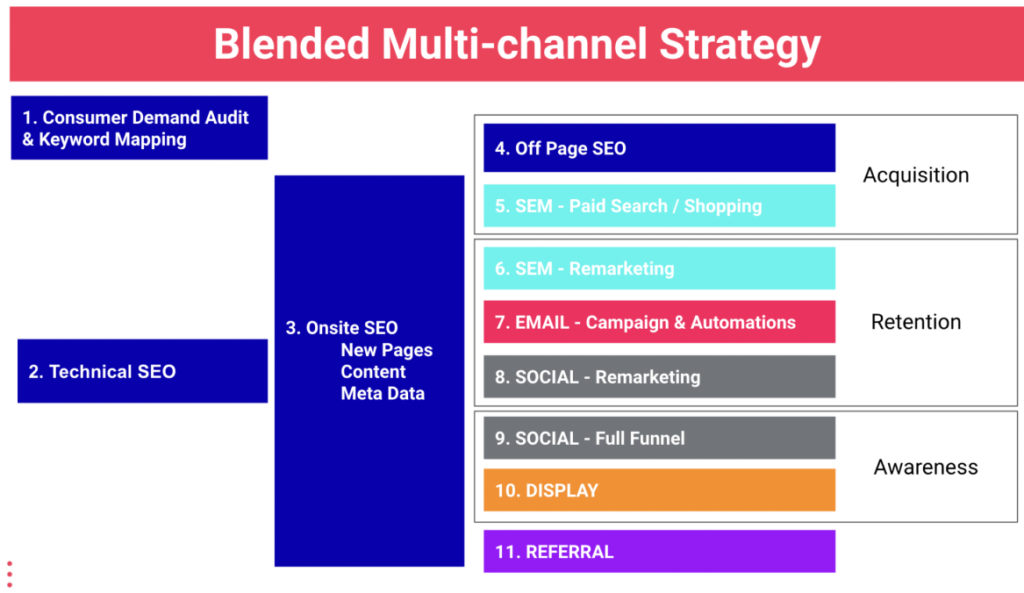
At LION, we follow a Blended Multi-channel Methodology, a holistic strategy encompassing Customer Acquisition, Retention and Brand Awareness with SEO the foundation. Our model is based on having specialised teams across each channel lead by a director with over a decade of experience in their channel and eCommerce.

Why is SEO the Foundation? 

While the goal of SEO is generally to increase Organic Sessions and Revenue through improved Visibility and Rankings, SEO is focused on optimising the performance of the entire website, which in turn can improve the results of all other channels and activities. 

How can SEO improve
the entire site
& all other channels?

Well, let’s look at a couple of examples:
  • Improving Website Speed by 0.1 seconds can increase the Conversion Rate of all channels by 8% (all else remaining equal, that’s an 8% increase in Revenue) as per Think with Google.
  • Fixing Broken Links reduces bounce rate, improving User Experience & Conversion Rate.
  • Resolving indexing issues can boost Visibility leading to increased Awareness, Sessions 
  • Implementing Structured Data like FAQs and Reviews improves User Experience & Conversion Rates.

2 Creating New Pages for Key Customers Segments 

  • Increases Visibility of targeted Keywords, Segments and Products 
  • New Pages can serve as Landing Pages for other activities like SEM, Email and Social.
  • Improves User Experience, reduces Bounce Rate, Increases Time on Site & Pages Viewed
  • Improves Conversion Rate of not just the Organic channel but all traffic is driven to the page. 

LIONs Multi-channel Methodology

The diagram below shows the different facets of a Multi-channel Strategy and how SEO is the foundation.

Already have a solid Website Foundation?

It’s time to consider Customer Acquisition, Retention and Awareness. Now, there’s some overlap between the channels and activities with Customer Acquisition and Retention generally higher priorities as they are key revenue drivers and where most sites can generate the quickest revenue wins – and let’s face it, we all want more revenue, right!

We’ve also included some insight into additional activities that can support awareness, acquisition and retention.

1 Customer Acquisition – New Visitors / Customers

Customer Acquisition is driven through SEO, Paid Search, Google Shopping, and to a lesser extent, Social and focused on enhancing the visibility of the site, supporting the acquisition of new users, customers and email subscribers and increasing total website sessions, transactions and revenue. 

Key Metrics – New Visitors, Sessions, User Experience, Conversion Rate, Transactions & Revenue (by both Total and Channel).

2 Customer Retention & Repurchase Rate – Repeat Visitors

Customer Retention and Repurchase Rate are largely driven via Email Marketing, Social & Display Remarketing to re-engage with both past visitors and lapsed customers to cross and up-sell, reduce the time between and frequency of visits, acquire subscribers & reviews ultimately increasing revenue from Repeat Visitors & Customers. 

This phase may also involve mapping out and focusing on strategies to increase the Customer Lifetime Value.

Key Metrics – Increased Frequency of and Reduced the Time between Visits, Increased Repurchase Rate, Email Subscribers & Reviews and ultimately Revenue from Repeat Visitors. 

3 Brand, Product Awareness & Recall

Social and Display Network Ads are used to raise brand and product awareness for key customer segments, increase brand recall, support off & online marketing initiatives and acquire new visitors. 

Note, Awareness activities are measured by impressions & reach, typically only contributing a small percentage of overall revenue.

  • Key Metrics – Impressions & Reach
  • Secondary Metrics – Sessions & Revenue

Multi-channel Consulting – Have the basics covered and
still want more?

At LION we’ve developed a new initiative where our Senior Directors & Consultants with 10+ Years in eCommerce conduct regular reviews identifying current performance, new multi-channel opportunities and initiatives to help you succeed.

From referral platforms like Commission Factory to Influencer Marketing, all of which add value from greater Brand & Product Awareness to more Sessions & Revenue. What’s most important in implementing these additional activities is to –

1 Understand how they will support the wider strategy, i.e. What’s the goal? Is it?

  • Brand or Product Awareness & Reach
  • Email Subscriber Acquisition
  • Sessions, Conversions or R

2 Have KPIs and Metrics in place so that results & success (or lack thereof) can be measured. 

For instance, if considering Influencer Marketing rather than just handing out $X for a review or sponsored post, actually identifying how many Impressions, Engagements or Sessions you need for an activity to be worthwhile and set that as a KPI. 

If it doesn’t meet the KPI, understand why and use that to inform strategy and investment decisions moving forward.

Getting Started with Multi-channel?

Need help putting it all together and developing a comprehensive multi-channel strategy that drives growth and makes commercial sense. 

Want to supercharge your site, generate more revenue and implement a measurable strategy?

GET IN CONTACT TODAY AND LET OUR TEAM OF ECOMMERCE SPECIALISTS SET YOU ON THE ROAD TO ACHIEVING ELITE DIGITAL EXPERIENCES AND GROWTH

Article by

Christopher Inch – Head of Strategy

Chris is a specialist in eCommerce with over 14 years of experience in Digital & eCommerce Strategy, including Search Marketing, Social Media, Email Marketing Automation and Web Development.

Like what we do? Come work with us

eCommerce Website Migration – Avoid Losing Traffic & Revenue

Moving or migrating a site is an event that promises significant benefits in the long term and equally substantial troubles in the short term. While it is impossible to avoid the latter, there are ways to minimise risk. 

The site is a very fragile system, and changing or moving any part of it can significantly affect the structure of the site and its performance. But it is pretty common for those who make decisions about a site migration to underestimate the complexity of the work and the associated risks.

An example of how easy it is to underestimate a migration can be taken from one of our larger clients. The client had just engaged a developer to work internally to redesign and rebuild their website. The focus of the work was a simple template change to improve the UX and customer journey throughout the website. Our involvement in the project was kept brief, as the developer ensured the client that there would be no significant URL changes as part of the project.

Two weeks before launch, our team happened to ask for the staging site to check in on the progress, and we found that every category page URL had changed, including the placement within the site, causing some 100,000+ URLs to be affected. Luckily, our team was able to get the migration and web build back on track, ensuring that our client’s revenue and business is protected.  

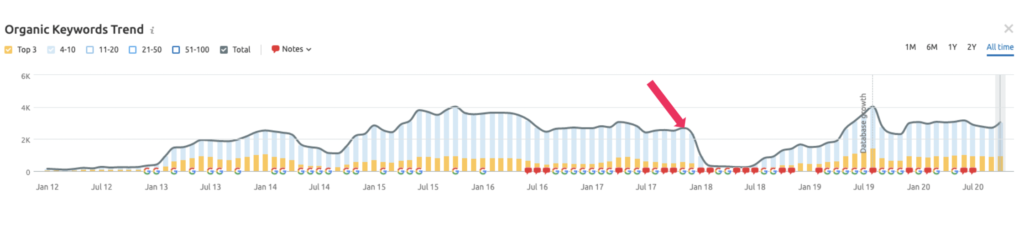
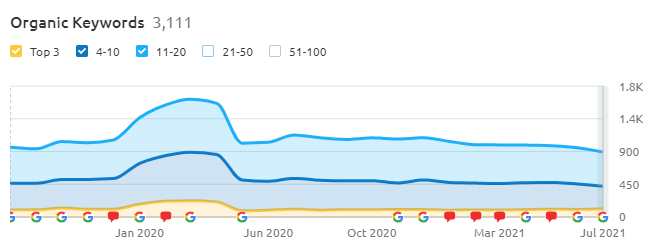
If not discovered, this could have cost the client significantly, resulting in a potential loss of millions of dollars. Resolving this failure may have taken several months, while the business would have continued to lose organic revenue month on month until repaired. See below the keyword rankings of a past failed migration of a prospective client:

Web development and SEO migration are two different masteries and need to work hand in hand. SEO migration is the most common digital blind spot, needs to be taken seriously and requires the right team of specialists. 

When deployed correctly, a new website can be a great initiative and is an essential part of every online retailer’s digital journey. However, an incorrectly managed site migration often has disastrous consequences for immediate and long term financial performance and can set a business back years.

If you’re preparing to migrate, don’t get caught out and call us today. Let our specialised migration team help support your business through this challenging project.

Book a call to see if you qualify for our complimentary Google Console Audit

GET IN CONTACT TODAY AND LET OUR TEAM OF ECOMMERCE SPECIALISTS SET YOU ON THE ROAD TO ACHIEVING ELITE DIGITAL EXPERIENCES AND GROWTH 

Contact Us

Article by

Leonidas Comino – Founder & CEO

Leo is a, Deloitte award winning and Forbes published digital business builder with over a decade of success in the industry working with market-leading brands.

Like what we do? Come work with us

6 Essential eCommerce Marketing Tools For Your Business

Do you know your competitors? What strategies are they using for success? The importance of being proactive rather than reactive is essential to your business success. The primary purpose is to understand the strengths and weaknesses of your business in comparison to your competitors. You will recognise how you can enhance your business strategy.
In this article, we collected the best tools to analyse the activities of your competitors as well as your business improvements.

1.Google Mobile Speed Test

https://www.thinkwithgoogle.com/intl/en-aunz/feature/testmysite/

What is it?

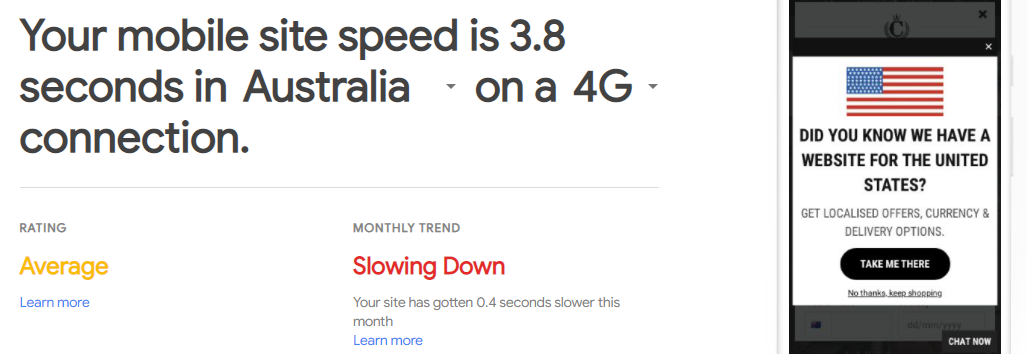
The Google Mobile Speed Testing tool allows you to measure the speed of your entire mobile site. The Site speed results are based on real-world data collected via the Chrome User Experience Report(CrUX). The CrUX report is updated monthly and is the source of both current and historical data.

It provides a rating for your site and identifies the monthly trend, whether improving or getting slower. What’s more, it offers a series of recommendations and allows you to compare your mobile site vs your competitors and even calculate the potential revenue generated if you were to improve the speed of your site.

What is it used for?

Website load speed is critically important to success, generally speaking, the faster the website, the better the user experience and conversion. This tool is valuable because it provides a list of recommendations for improving speed and can indicate the revenue impact of improving site speed based on real users data.

2.Builtwith

https://builtwith.com/

What is it?

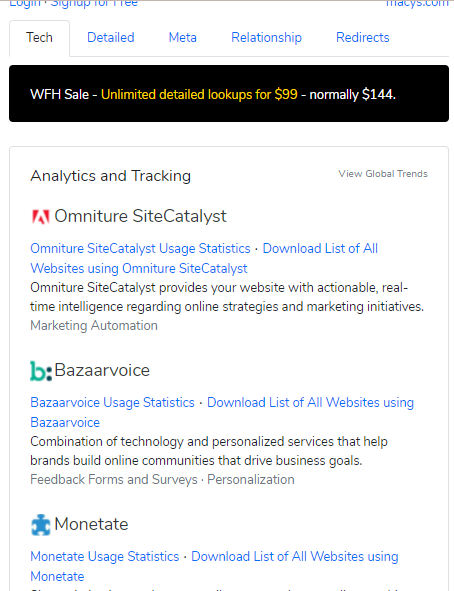
BuiltWith is a great tool that allows anyone to analyse the technology that a website is built on; it provides detailed information via the website and has a handy Chrome extension. 

What is it used for?

Built with allows you to quickly analyse a competing website’s technology platform and identify essential tech like –

Content Management System

eCommerce Platform

Email Service

3.Semrush

https://www.semrush.com/

What is it?

SEMrush is a digital marketing tool that is predominantly focused on SEO.  

It includes a massive range of helpful information for analysing Organic Performance like Keyword Rankings, Keyword Research, Traffic Analytics and even Paid Advertising.

What is it best used for?

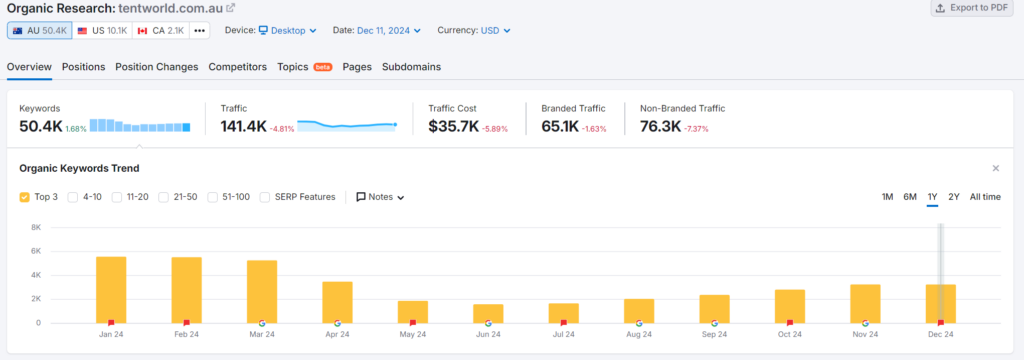
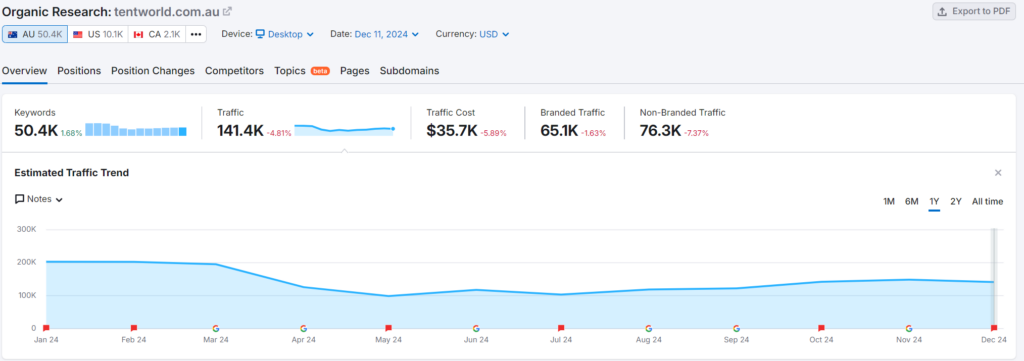
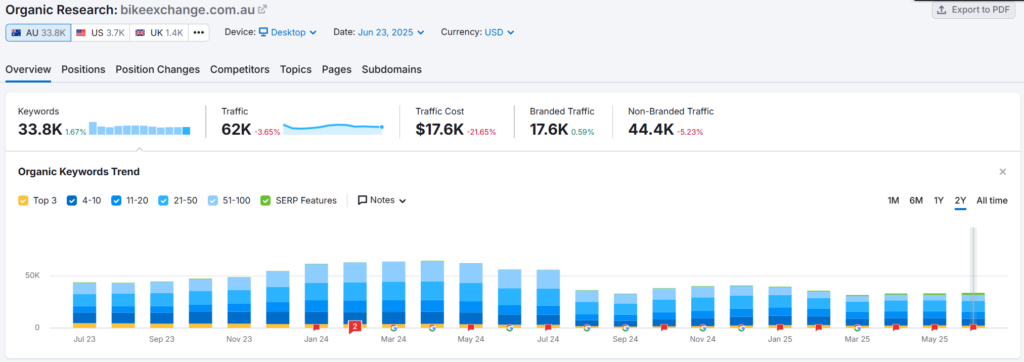
Semrush is best used to view the keyword ranking data – with a publicly available account; it is possible to see keyword rankings over time. The graph below shows the rankings for the top 20 keywords over the past two years. 

Note, if keyword rankings haven’t grown and a business is working with an SEO agency or consultant, this would indicate a problem.

4. Similarweb

https://www.similarweb.com/

What is it?

Another Digital Marketing tool that can be used to identify traffic volume per channel and compare versus competitors. To provide indicative data, this tool uses a combination of algorithmic data and cookies.

What is it used for?

While only an indication, this tool is best used to compare performance versus competitors. 

5.SEO Peek

https://chrome.google.com/webstore/detail/seo-peek/lkkpfhgjmocgneajknedjhodkjkkclod?hl=en

What is it?

SEO Peak analyses a website page to display the Meta Information in a simple format. 

Meta Information is the code behind the page that can impact what keyword your page ranks for. It is used by Google (and other Search Engines) to understand what a page is about and how it should be categorised. It includes things like:

  • Page Title 
  • Meta Description 
  • Meta Keywords 
  • H1 Tags

What is it used for?

While Google is getting significantly better at understanding what content is on a page, providing Google with additional instructions through metadata is critically essential.

Pictured shows a brief example of a site that has limited metadata.

What is it?

Google Trends graphs the interest in a search term or topic over a period of time, which can be filtered by region. The graph below shows the Beauty topic in Australia over the last 5 years – the graph shows the topic is gradually becoming less popular.

As per Google – Numbers represent search interest relative to the highest point on the chart for the given region and time. A value of 100 is the peak popularity for the term. A value of 50 means that the term is half as popular. A score of 0 means there was not enough data for this term.

What is it used for?

Google Trends is an excellent tool for understanding how popular a topic is over a period of time. An increase in popularity would indicate more searches occurring. This is great for understanding seasonality and year on year growth.

Need help with understanding the best tool for your business?

GET IN CONTACT TODAY AND LET OUR TEAM OF ECOMMERCE SPECIALISTS SET YOU ON THE ROAD TO ACHIEVING ELITE DIGITAL EXPERIENCES AND GROWTH 

Article by

Leonidas Comino – Founder & CEO

Leo is a, Deloitte award winning and Forbes published digital business builder with over a decade of success in the industry working with market-leading brands.

Like what we do? Come work with us

The Importance of Website Speed Optimisation – Part 2

Page load speed affects different factors. Many search engines, when ranking sites, have begun to take into account the page load speed. The faster your site loads, the more visitors you can get from search engines and, consequently, earn more money.

In the previous article related to website speed optimisation, we concluded that it is essential to have a thorough website analysis to identify the exact reasons that affect performance. Here we will cover some general tips and guidance to improve your site’s performance.

So, what can you do to increase the speed of your website?

Optimising server response speed: changing hosting/server

Very often, it’s crucial to pay attention to the very base of your website – its hosting/server. One of the tell-tale signs of poor performance is the server’s response time on your website exceeding the recommended maximum.

If the server in your location is inefficient, shared hosting will be, too, generally. To fix that, you might want to switch to VPS. If your website is “heavy”, – take a dedicated server. If your online platform is more on the simple side – change the hosting to a local provider.

Here are some additional suggestions that might genuinely make a difference:

1. Reduce the number of requests to the server. Use Google Chrome’s Network Panel to find out how many requests your website needs to load a page, and which files (especially images) are the heaviest. Then you have to decide which images to compress and which ones to erase to reduce the number of requests.

2. Turn on server-level caching and configure client-side caching

Optimising content loading

Regarding the optimisation of content loading, let us restate what we said in the previous article: there should be a balance between the quality of your content and its loading speed. Don’t sacrifice quality over speed: try to keep your images clear and detailed for the customers’ convenience.

Here are a few simple things you might consider following:

1. Use Screaming Frog or Page Speed Insights to check the weight of the images on your website

2. Try to compress the images to about 200-400 kB (or at least not use images above 1 MB), and then check the quality

3. Connect your website to LazyLoad

4. Use a CDN (Content Delivery Network) for images on your website. Pay attention to what kind of CDN you’re using: a nonoptimal CDN can have an adverse effect and slow down the loading speed, which is something we want to avoid.

5. Change the file extensions to WebP, a compressed image format with higher image quality than JPEG, GIF, and PNG for the same size.

Optimising content rendering

When it comes to content rendering, it’s essential to tell apart the necessary and unnecessary processes on the website. A few things you can do:

1. Use LazyLoad for the site to not render the parts of the page outside the user’s visibility. The program will split the content and load it into chunks

2. Hide the elements that are not needed in the mobile version of the site

3. Set up asynchronous loading. Transfer scripts to asynchronous: everything from the head to the footer

Regarding the rendering speed indicated on the Page Speed Insights tool – it is a great tool, no wonder it’s popular, but it might not always have the depth needed to identify all the issues. Therefore, we suggest it only as a free, good entry-level tool.

Additional rules

There are also some additional rules to follow to speed up your website that don’t have anything to do with the server, the content loading, and rendering:

1. Use a 304 Not Modified response code to indicate that the search engine can use the cached content.

2. Get rid of things that might slow your website down unnecessary web fonts, redundant CSS and JS

3. Disable unnecessary plugins and modules that create additional load on the server. This might often be true for WordPress sites.

4. Optimise your use of DOM (Document Object Model)

5. Optimise your databases: most of the brakes are associated with them

These are some general rules to keep in mind when working on optimising your website speed. However, even though the things we suggest are widely applicable and might take your website several steps ahead, there can be hundreds of different reasons why your website is slow. Many additional website features can always give an immense boost to your online platform’s performance. 

Here at LION Digital, we are driven by growth and innovation and have a voracious hunger for success. We provide premium eCommerce marketing services to successful Australian eCommerce companies. Our team of experts will tackle any problem you might be having with your website and deliver the best possible outcome. Drop us a message today and let our team of experts set you on the road to success. 

Subscribe and stay tuned for more helpful content to come!

Wondering why you’re not getting the results you expect?

GET IN CONTACT TODAY AND LET OUR TEAM OF ECOMMERCE SPECIALISTS SET YOU ON THE ROAD TO ACHIEVING ELITE DIGITAL EXPERIENCES AND GROWTH 

ROI vs ROAS. How To Calculate Effectiveness Of Your Advertisement?

Digital and eCommerce are relatively new forms of marketing. They use contemporary terms, often confusing language and several three and four-letter acronyms. We’ll focus on a couple of the most important for tracking overall performance ROI (Return on Investment ) and ROAS (Return On Ad Spend). 

What is ROI/ROAS? Why is it important to measure both?

What is ROI?

ROI or Return On Investment is the revenue (or return) generated divided by the investment. ROI can be calculated across the entirety of digital or by individual activities/channels with granularity the beauty of digital marketing. 

REVENUE / INVESTMENT = ROI

Ultimately, it’s a calculation of how much you’re generating for every dollar you spend. 

Let’s look at an example: If you invest $5,000 and generate a $25,000 return, your Return On Investment is 5 times, or $5 for every dollar invested.

What is ROAS?

ROAS, or Return On Ad Spend, is also a measure of the Revenue (or return) generated divided by the Investment; however, in this case, it’s an investment into advertising, in digital most commonly that’s Google or Facebook.

REVENUE / AD SPEND = ROAS

Let’s look at an example of ROAS: If you invest $5,000 into Advertising and generate a $25,000 return, your Return On Ad Spend is 5 times, or $5 for every dollar invested.

Why is it important to measure both ROI & ROAS?

You’re probably sitting there thinking it’s the same thing. It’s not. The difference between ROI and ROAS is that ROAS calculates how much you’re generating for every dollar spent on advertising. Now it’s important to remember that you’re most likely paying a service fee, a retainer (or a staff member) to manage the advertising. 

So let’s revisit the example: $5,000 Advertising Spend, plus $5,000 management retainer to generate $25,000 in Revenue.

ROAS = $25,000 / $5,000 = 5

I.e. your Return On Ad Spend is $5 for every dollar spent.

ROI = $25,000 / $10,000 = 2.5

Return On Investment (that’s the total investment) is 2.5.

Search Engine Marketing (SEM/PPC) is prevalent in measuring Return On Ad Spend. However, it’s critically important also to measure the Return On Investment. Remember that Return On Investment is the total invested while ROAS is only a measure of advertising spending.

Not satisfied with your company’s ROI and ROAS?

GET IN CONTACT TODAY AND LET OUR TEAM OF ECOMMERCE SPECIALISTS SET YOU ON THE ROAD TO ACHIEVING ELITE DIGITAL EXPERIENCES AND GROWTH

Article by

Leo Comino –
Founder & Global CEO